
What if your next app could think and learn by itself? AI apps are no longer just future ideas. They’re already changing how we use technology.
But learning how to build an AI app can feel confusing, like being in a maze without a map.
This guide will walk you through each step. You’ll learn the main parts of an AI app, how they fit together, and how simple ideas can grow into smart, useful tools.
Whether your goal is to solve problems, entertain, or make life easier, this is where your work with AI begins.
Why Build an AI App?
The global AI software market is growing very fast. According to Statista, it will reach $126 billion by 2025, up from only $10 billion in 2018. This growth shows a big change. People and businesses now expect apps to have smart AI features as normal.
As Andrew Ng, co-founder of Google Brain and Coursera, said,
“AI is not just a technology. It’s the new electricity.”
Just like electricity changed every industry, AI is changing the future. Building AI applications helps you join this change and shape what comes next.
Here are some reasons to build an AI app:
- Enter a growing market with more demand for smart technology.
- Give users personal experiences that fit their needs.
- Automate tasks to save time and money.
- Get ahead with AI features in a busy app market.
By making an AI app, you put yourself at the front of this big technology change.
Steps to Build an AI App
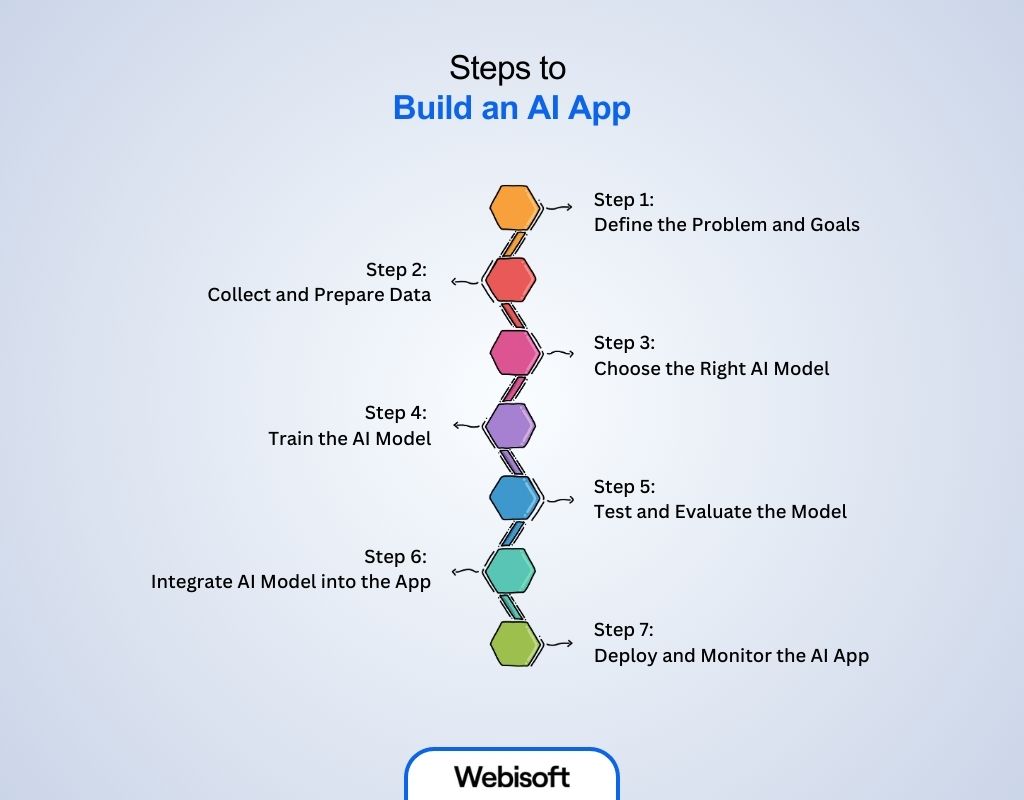
Making an AI app can feel hard, but it’s easier when you follow clear steps. This guide explains how to build an AI app by walking you through the process from choosing what your app will do, getting the right data, picking tools, training the AI, and understanding the full AI development steps before finally building and testing your app. With these steps, you can turn your idea into something real.
Step 1: Define the Problem and Goals
Before you start building your AI app, you need to clearly understand the problem you want to solve. When the problem is clear, it is easier to set your goals.
These goals then guide you to choose the right data and the best AI solution. After setting your goals, you can confidently begin collecting the data you need.
To define the problem and goals, think about these key points:
- Identify the problem: Find the exact challenge or opportunity your app will address.
- Set clear goals: Decide what success means, such as improving accuracy or saving time.
- Understand your users: Know who will use your app and what they expect from it.
- Define success criteria: Choose how you will measure if the app is working well.
When your goals are clear, you will know exactly what data to collect and how to prepare it for your AI model.
Step 2: Collect and Prepare Data
The success of your AI app depends on good data. Since your goals are clear, you know what kind of data to collect. After you gather the data, you need to clean and organize it carefully.
Sometimes, you also need to label the data so the AI can learn well. Preparing the data this way helps reduce mistakes and makes training faster.
Focus on these important data tasks:
- Collect relevant data: Find data that is directly related to your problem.
- Clean the data: Remove errors, duplicate records, or any information that does not help.
- Label the data: Add tags or notes to the data if your AI needs supervised learning to understand it better.
- Split the data: Divide the data into parts for training, validating, and testing the AI model.
With prepared data in hand, the next step is to select the AI model best suited to your problem and data type.
Step 3: Choose the Right AI Model
Choosing the right AI model is important because different tasks need different models, like for images or text. Since you have your data ready, it helps you pick the best model.
Sometimes, you can save time by using a pre-trained model and adjusting it to your needs. If that doesn’t work, you can build a custom model from scratch. Using tools like TensorFlow or PyTorch makes building the model easier.
Consider these factors when selecting your AI model:
- Match model type to problem: Decide if you need classification, regression, clustering, or another AI type.
- Balance complexity and resources: Complex models may perform better but require more time and computing power.
- Choose pre-trained or custom models: Pre-trained models can be fine-tuned; custom models are built from scratch.
- Select development frameworks: Use tools like TensorFlow or PyTorch to build and train your model.
After choosing a model, you will train it to recognize patterns in your prepared data.
Step 4: Train the AI Model
Training means teaching the model using your data. As the model learns, it changes its settings to give better answers. To control this, you choose how fast it learns and how many times it practices.
While training, you must watch the model closely to avoid a problem called overfitting. Overfitting happens when the model learns too much from the training data and then performs badly on new data.
Here’s what to focus on during model training:
- Set training parameters: Configure learning rate, batch size, and number of training cycles (epochs).
- Run the training process: Feed data into the model and allow it to learn from examples.
- Monitor progress: Track metrics like accuracy and loss to see how well the model is learning.
- Prevent overfitting: Use methods such as dropout or regularization to ensure the model generalizes well to new data.
Once trained, your model needs to be tested to confirm it performs well with unseen data.
Step 5: Test and Evaluate the Model
Testing checks how well the model works with new data it hasn’t seen before. This tells if the model can make good decisions and reach your goals.
To evaluate, you look at its accuracy and mistakes. If the model does not do well, you may need to prepare the data or train it again. The model must work well here before you use it in your app.
Important evaluation steps include:
- Test with new data: Use the reserved test dataset to evaluate model accuracy and reliability.
- Analyze errors: Identify where the model makes mistakes and why.
- Measure success metrics: Compare model results to your original goals.
- Improve if needed: Adjust data, model, or training to improve performance.
After confirming the model is reliable, it can be integrated into your app for real-world use.
Step 6: Integrate AI Model into the App
Integration means joining the AI model with the app’s interface and backend to create a SaaS app with AI. This lets users easily use the model’s features.
You create a smooth process where the app sends user data to the model and shows the AI’s results right away. The app must be fast and able to handle many users without slowing down.
Key points for successful integration include:
- Design user interface: Create easy ways for users to input data and view AI results.
- Connect backend and AI: Develop APIs or services that communicate between the app and the model.
- Ensure scalability: Plan infrastructure so the app can handle many simultaneous users.
- Test integrated app: Check the app’s functionality to confirm the AI works as expected.
Once integration is done and tested, the final step is deploying the app and maintaining its performance over time.
Step 7: Deploy and Monitor the AI App
Deploying means making your AI app ready for users by using cloud or local servers. Once the app is live, you need to keep watching how it performs and listen to user feedback.
This allows you to find any problems early. Then, you update the AI model regularly with new data so the app stays accurate and useful over time.
Focus on these during deployment and monitoring:
- Choose deployment platform: Decide on cloud providers or local servers based on needs and costs.
- Monitor performance: Track speed, accuracy, and user behavior continuously.
- Collect feedback: Use user input to find issues or areas for improvement.
- Update model regularly: Retrain or fine-tune your AI model with new data over time.
- Maintain security: Protect sensitive user data and comply with regulations.
This ongoing process keeps your AI app valuable and effective well into the future.
Top Tools and Platforms to Create an AI App
Choosing the right tools is essential for how to build an AI app successfully. This section introduces the most popular platforms and software that make AI app development faster, easier, and more efficient even if you’re just starting out.
| Tool / Platform | Key Features | Typical Use Cases | Notes |
|---|---|---|---|
| TensorFlow |
Open-source, flexible, supports deep learning models |
Image recognition, NLP, recommendation systems |
Developed by Google, widely used |
| PyTorch |
Dynamic computation graph, easy debugging |
Research, prototyping, natural language processing |
Preferred in academia and research |
| Microsoft Azure AI |
Cloud-based, pre-built AI services, scalable |
Chatbots, vision AI, speech recognition |
Integrated with Azure cloud |
| IBM Watson |
NLP, machine learning APIs, visual recognition |
Customer service, data analysis, healthcare |
Strong in enterprise solutions |
| Google Cloud AI |
AutoML, vision, speech, and language APIs |
Automated model training, speech-to-text, vision |
Strong Google ecosystem integration |
| Amazon SageMaker |
End-to-end ML lifecycle management |
Model building, training, deployment |
Integrates well with AWS services |
| OpenAI API |
Powerful NLP models like GPT |
Chatbots, content generation, code assistance |
Easy-to-use API for text generation |
| Hugging Face |
Transformer models library, community-driven |
NLP, transfer learning, model fine-tuning |
Popular for state-of-the-art NLP |
| Keras |
High-level neural network API, user-friendly |
Rapid prototyping, beginner-friendly deep learning |
Runs on top of TensorFlow |
| DataRobot |
Automated machine learning platform |
Business AI, predictive analytics |
No-code/low-code AI building |
Common Challenges in Artificial Intelligence App Development
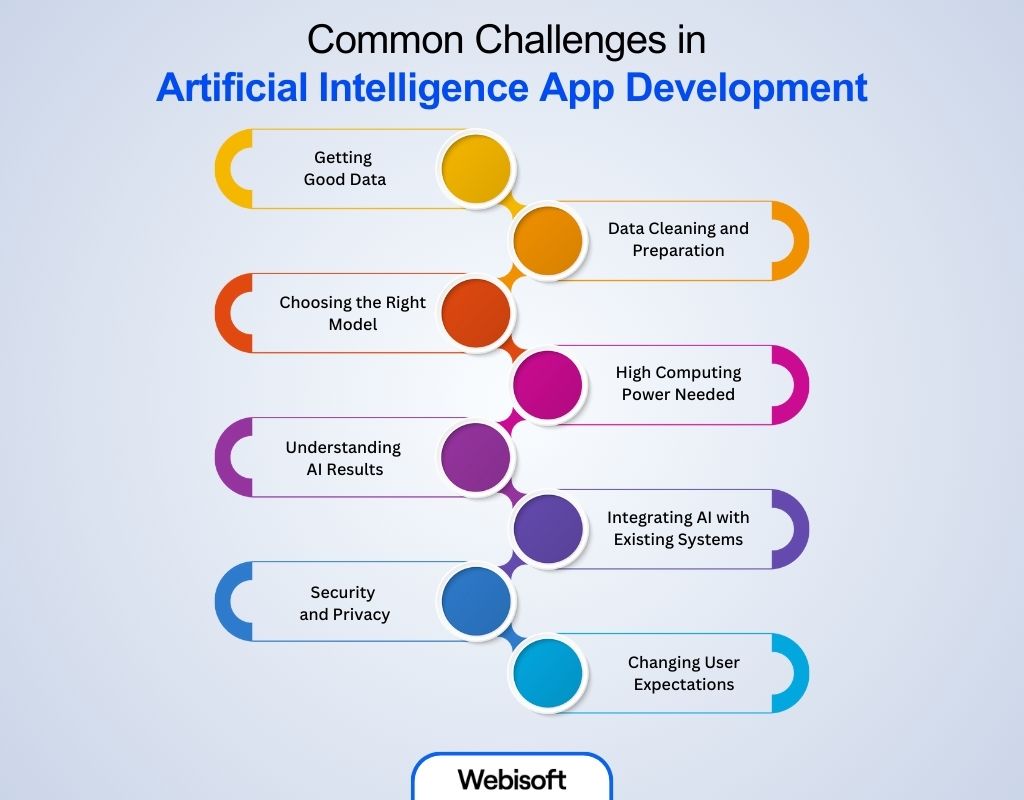
AI app development can be tough if you don’t know what issues to expect. Whether you’re learning how to build an AI app or exploring how to create an AI app, understanding common problems like messy data, high costs, and model errors helps you plan better and avoid mistakes early on.
- Getting Good Data: AI needs lots of data to learn and work well. But sometimes, it’s hard to find enough good quality data. Without good data, AI can’t make good decisions.
- Data Cleaning and Preparation: Raw data often has mistakes or missing parts. Before using it, you need to clean and organize the data, which takes a lot of time and effort.
- Choosing the Right Model: There are many AI models (types of programs). Choosing the right one for your app is tricky because each model works best for different tasks.
- High Computing Power Needed: AI apps often need very strong computers to train and run. This can be expensive and slow if your computer is not powerful.
- Understanding AI Results: AI can give answers, but sometimes it’s hard to understand why it gives those answers. This makes it difficult to trust AI completely.
- Integrating AI with Existing Systems: Adding AI to old or modern apps can be hard because AI needs to work smoothly with them.
- Security and Privacy: AI apps use a lot of personal data, so protecting this data is very important but challenging.
- Changing User Expectations: People expect AI to be very smart and accurate, but AI is not perfect. Managing what users expect is hard.
Artificial intelligence applications in business
AI is changing how businesses work every day. Here, you’ll see real examples of how companies use artificial intelligence to save time, improve customer service, increase sales, and make smarter decisions.
| AI Application | Description | Business Examples | Benefits |
|---|---|---|---|
| Customer Service Automation |
AI-powered chatbots and virtual assistants |
Chatbots on e-commerce sites, call centers |
24/7 support, faster response, cost saving |
| Sales and Marketing |
Predictive analytics, customer segmentation, personalization |
Targeted ads, lead scoring, recommendation engines |
Higher conversion rates, better targeting |
| Supply Chain Optimization |
Demand forecasting, inventory management using AI |
Predictive restocking, logistics planning |
Reduced costs, improved efficiency |
| Fraud Detection |
Identifying fraudulent transactions and behaviors |
Banking, insurance claim validation |
Minimized losses, improved security |
| Product Recommendations |
Personalized product or content suggestions |
Netflix, Amazon recommendations |
Increased sales, improved customer experience |
| Financial Forecasting |
AI-driven market analysis and risk assessment |
Stock market prediction, budgeting tools |
Better investment decisions, risk reduction |
| Process Automation (RPA) |
Automating repetitive tasks |
Invoice processing, data entry |
Increased productivity, reduced errors |
| Sentiment Analysis |
Analyzing customer feedback and social media opinions |
Brand monitoring, market research |
Improved product development, customer insights |
| Quality Control |
Using AI for defect detection and predictive maintenance |
Manufacturing inspection, equipment monitoring |
Higher quality, less downtime |
How Webisoft Can Help You Create Your Own AI App
Making an AI app can be challenging, but Webisoft offers complete support to develop a smart, effective, and easy-to-use app designed for your needs. Whether you’re starting from scratch or want to improve an existing product, our solutions make it easier to adopt AI and speed up your app development.
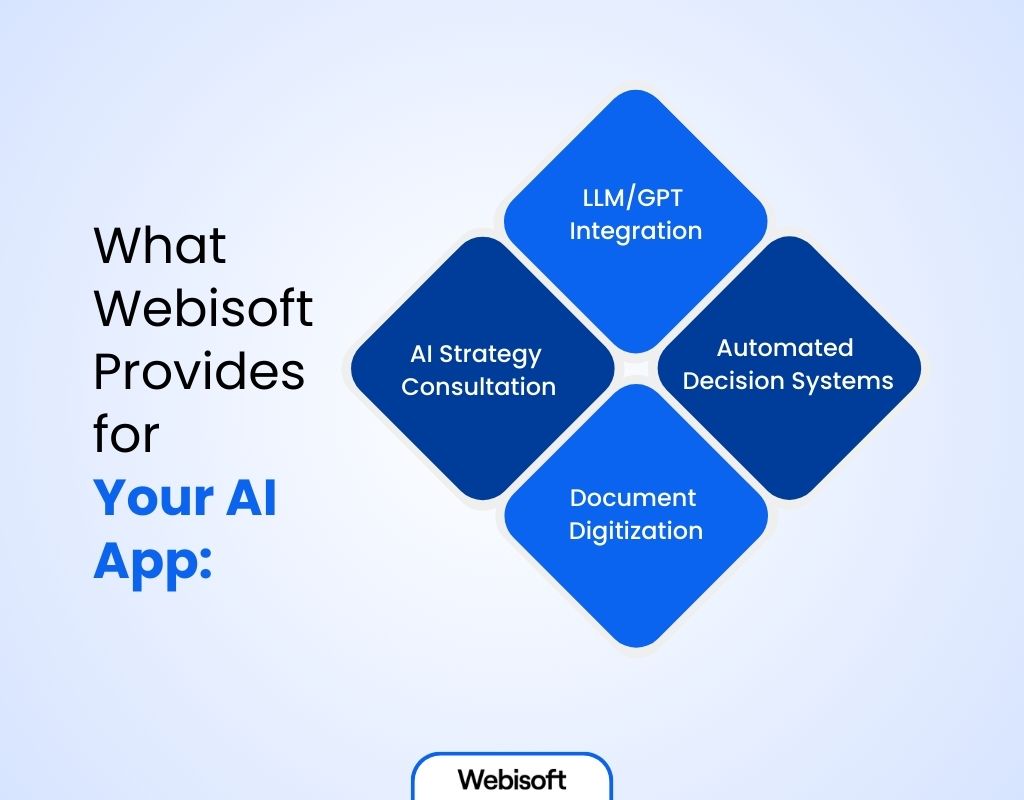
What Webisoft Provides for Your AI App:
- AI Strategy Consultation: We help you plan the best AI approach that matches your business goals and challenges.
- LLM/GPT Integration: Add strong language understanding and response features to your app, improving how users interact and how data is analyzed.
- Automated Decision Systems: Create AI tools that review data quickly and handle complex decisions automatically to save time and reduce mistakes.
- Document Digitization (OCR): Convert paper documents into precise digital files fast, making your processes smoother and faster.
By working with Webisoft, you get expert guidance on how to make an app using AI and receive development support that fuels innovation and helps your app grow.
In Closing
Still, building an AI app takes focus and care at every step. In the end, each choice shapes how well your app learns and performs. Even so, understanding how to build an AI app breaks the process into clear, manageable parts.
That said, keeping data quality, model selection, and integration in balance is key to success. After all, your app’s value grows when it works reliably and fits user needs smoothly.
If you’re interested in creating an AI app or how to develop an AI application, Webisoft can assist you with simple plans to create AI models made just for you.
Frequently Asked Questions
The time to build an AI app varies based on complexity. A simple AI app can take a few weeks, while more advanced apps with custom models and integrations might take several months.
A: You can build an AI app alone if you have the right skills and tools, especially for simple projects. However, complex AI apps often benefit from a team with diverse expertise in data science, development, and design.
Yes, there are many no-code and low-code platforms like Microsoft Power Apps, Bubble, and Google AutoML that let you build AI-powered apps without deep coding knowledge.
Some AI apps can work offline if the AI models are small and embedded on the device. But many AI apps require internet access to connect with cloud services for heavy processing or data updates.