Share


Best AI Tools for Small Businesses (2025 Guide)

- BLOG
- Artificial Intelligence
- October 19, 2025
When I first started exploring AI for small businesses, I’ll admit I was skeptical. The term “AI” felt like it belonged to big tech companies with deep pockets and entire teams of data scientists. But over the past couple of years, I’ve seen that picture change completely. In 2025, AI tools are not just for the giants — they’re practical, affordable, and often essential for small businesses trying to stay competitive without burning out.
Contents
- 1 Why Small Businesses Are Turning to AI
- 2 AI Is More Accessible Than Ever
- 3 Clearing Up Common Myths
- 4 How to Evaluate AI Tools for Your Small Business
- 4.1 Cost: What Are You Really Paying For?
- 4.2 Scalability: Will the Tool Grow With You?
- 4.3 Ease of Use: Can You and Your Team Actually Use It?
- 4.4 Integration: Does It Play Well With Your Other Tools?
- 4.5 Security: How Does It Handle Your Data?
- 4.6 Support: Will You Get Help When You Need It?
- 4.7 The Role of Trust and Transparency
- 5 AI Tools for Marketing and Social Media
- 6 AI Tools for Sales and Customer Relationship Management
- 6.1 How AI Helps Small Businesses Sell Smarter
- 6.2 HubSpot AI — Smart CRM That Scales
- 6.3 Salesforce Einstein — AI Power for Complex Sales
- 6.4 ChatGPT-Powered Sales Assistants — Flexible and Customizable
- 6.5 What to Prioritize When Picking AI Sales Tools
- 6.6 Other Tools Worth Exploring
- 6.7 Example of an AI-Powered Sales Workflow
- 7 AI Tools for Customer Service and Support
- 7.1 How AI Helps Small Businesses Improve Support
- 7.2 SupportGPT — Affordable AI That Feels Personal
- 7.3 Botpress — A Custom Chatbot That Adapts to Your Needs
- 7.4 Where AI Fits Into Customer Support
- 7.5 Other Tools to Consider
- 7.6 Tips for Choosing the Right AI Support Tool
- 7.7 A Sample AI-Driven Support Workflow
- 8 AI Tools for Operations and Productivity
- 8.1 How AI Helps Small Businesses Stay Organized
- 8.2 Notion AI — Smarter Notes, Tasks, and Knowledge Management
- 8.3 Sembly AI — Meeting Transcription Without the Hassle
- 8.4 Trello with AI Features — Smarter Project Boards
- 8.5 Other AI Productivity Tools to Explore
- 8.6 How AI Improves Productivity Without Adding Complexity
- 9 AI Tools for E-commerce and Retail
- 10 AI Tools for Website and Content Creation
- 10.1 Where AI Fits in Small Business Website and Content Work
- 10.2 Divi AI — Smarter Web Design for WordPress Users
- 10.3 Grammarly — Essential for Clean, Polished Copy
- 10.4 Piktochart — Quick Visuals Without a Design Team
- 10.5 FlexClip — Fast Video Creation for Small Teams
- 10.6 UXPilot — AI-Powered UI Design From Prompts
- 10.7 Final Tip on AI for Websites and Content
- 11 AI Tools for Distribution and Manufacturing Businesses
- 12 Comparison Table: Small Business AI Tools at a Glance
- 13 Key Challenges & Ethical Considerations When Using AI in Small Business
- 13.1 Understanding the Real Risks of AI Adoption
- 13.2 Data Privacy: Who Has Access to Your Business Data?
- 13.3 Bias in AI: The Patterns You Don’t See
- 13.4 Avoiding Over-Reliance: AI Is an Assistant, Not a Boss
- 13.5 Transparency: Let Customers Know When AI Is Involved
- 13.6 Final Thought: Build AI Into a Responsible Workflow
- 14 How to Successfully Integrate AI Tools into Your Workflow
- 15 Case Studies: Small Businesses Winning With AI
- 16 FAQs about AI Tools for Small Businesses
- 17 Conclusion: The Future of AI in Small Business
Why Small Businesses Are Turning to AI
Not long ago, AI felt like something reserved for large corporations with endless resources and entire teams of data scientists. But in 2025, that idea no longer holds true. AI tools have become practical, affordable, and often essential for small businesses that want to stay competitive without overwhelming their teams.
The biggest reason small businesses are embracing AI is that it helps teams do more with less. Many owners juggle marketing, operations, customer service, and finance—often in the same day. AI can lighten that load. From scheduling social media posts and automating customer support chats to analyzing sales data or summarizing meetings, AI turns time-consuming tasks into quick, often automatic processes.
Cost savings are another major driver. Some business owners hesitate, thinking AI tools will just add to their expenses. But the opposite is often true. A client I advised last year switched to an AI-based email marketing platform and reduced campaign time by 80% while increasing open rates. This kind of efficiency is why more small businesses are integrating AI into their daily operations.
AI also gives smaller teams access to capabilities that used to require a big budget. Predictive analytics, automated recommendations, and personalized marketing are now within reach. You don’t need to hire a specialist. Many AI-powered custom CRM development solutions, for example, integrate seamlessly with existing tools like Shopify or QuickBooks, and are built for non-technical users.
AI Is More Accessible Than Ever
Today’s AI tools are designed for everyone. You don’t need coding knowledge or a technical background. The best options integrate easily with platforms small businesses already rely on, and setup can often be completed in minutes. Just a few years ago, this wasn’t possible without hiring a developer.
Recent studies show that nearly 80% of small businesses plan to invest in AI by the end of 2025. That figure speaks volumes about how accessible and useful these technologies have become.
Clearing Up Common Myths
Small business owners often share concerns when first exploring AI. Let’s address a few of the most common ones:
- “AI is too expensive.” While some tools come with a premium price, many offer free plans or affordable starter packages designed for small businesses.
- “We don’t have the technical skills.” Most modern AI tools are built to be user-friendly. You won’t need a developer to get started.
- “AI will replace my employees.” In practice, AI handles repetitive tasks so your team can focus on creative, high-value work. It’s a tool for support, not replacement.
The best advice? Focus on solving real challenges, not on chasing technology for its own sake. The right AI tool should reduce complexity and free up your time.
How to Evaluate AI Tools for Your Small Business
Choosing the right AI tool can feel overwhelming. With so many options promising big results, it’s hard to know which ones truly deliver value. Over the years, I’ve developed a straightforward way to assess tools that helps small business owners avoid costly mistakes and focus on what actually works.
Cost: What Are You Really Paying For?
It’s tempting to only look at the monthly subscription price, but real costs often run deeper. Some tools charge per user, per task, or based on how much you use them. Others hide key features behind pricey upgrades. I’ve seen businesses pick an affordable tool, only to get hit with unexpected fees when they need essential integrations or higher limits. The key is to map out your actual needs from day one and check how pricing scales as your business grows.
Scalability: Will the Tool Grow With You?
The right AI tool should serve you now and in the future. I’ve worked with teams that outgrew their software within a year because it couldn’t handle more users, larger datasets, or advanced features. Before committing, explore whether the platform offers growth options without forcing expensive upgrades or migrations. Tools that align with flexible custom software development often provide better scalability as your operations expand.
Ease of Use: Can You and Your Team Actually Use It?
If an AI tool requires coding knowledge or hours of training just to get started, it’s likely not the best fit for a small business. Look for solutions designed with non-technical users in mind — platforms that offer demos, free trials, or simple onboarding guides. The best tools fit into your workflow without creating new obstacles.
Integration: Does It Play Well With Your Other Tools?
Compatibility matters. Your AI tool should integrate smoothly with your core platforms, whether that’s your ecommerce store, accounting software, CRM, or marketing suite. Lack of integration leads to more manual work, not less. Always review the integration options before signing up.
Security: How Does It Handle Your Data?
No matter your business size, data security is crucial. Trustworthy AI tools are transparent about their security practices, data storage, and privacy policies. Look for vendors who clearly communicate how they protect customer data — vague answers are a red flag.
Support: Will You Get Help When You Need It?
Issues are inevitable. What matters is how quickly you can get help. Prioritize tools that offer responsive support channels like live chat, email, or phone, and that maintain knowledge bases or community forums for quick answers.
The Role of Trust and Transparency
Trust is earned when vendors clearly explain what their AI does, how it works, and where the data comes from. Avoid tools that rely solely on hype without offering real details. Check independent reviews and ask tough questions during demos — credible providers will welcome them.
✅ Pro Tip: Create a simple table comparing tools by cost, scalability, usability, integrations, security, and support. This side-by-side view can clarify your decision.
AI Tools for Marketing and Social Media
Marketing is one of the first areas where I saw AI deliver real impact for small businesses. From local shops to growing online brands, I’ve worked with teams who felt overwhelmed trying to keep up with social content, ad campaigns, email lists, and analytics. AI doesn’t take away your creative work, but it does remove much of the repetitive busywork and provides smarter insights to guide your decisions. In this section, I’ll walk through the tools I’ve tested, recommended, or seen small business owners succeed with, along with where they work well and where they fall short.
Buffer – Simple Social Scheduling with Smart Suggestions
Buffer is a tool I’ve come back to repeatedly because of how clean and approachable it is. It focuses on making social media scheduling easy, with AI features that help suggest optimal post times and basic content recommendations. I like that it doesn’t overload you with complex options, which is perfect when you’re managing social accounts alongside a dozen other tasks.
Best for: Small teams that need an affordable, reliable tool to stay consistent with posting and basic analytics.
Pros: Affordable for most small businesses, integrates with major social platforms, and is very beginner-friendly.
Cons: The AI support is relatively basic. If you’re looking for in-depth campaign generation or advanced analytics, you may want to supplement it with another tool.
Pricing: Free plan for basic use. Paid plans start around $6 per month per channel.
Anyword – AI Copywriting with a Focus on ROI
Anyword is one I’ve recommended to clients who want help with paid ads, email subject lines, and short-form web copy. What makes it valuable is its predictive performance scoring, which lets you test and compare different variations to see which is likely to perform better before you even publish. I tested it on Facebook ads and saw click-through rates improve enough to stick with it.
Best for: Small businesses running paid ads that want to improve their copy using data-backed insights.
Pros: The predictive scoring helps you make smarter choices. It works well for short, high-impact text like ads and headlines.
Cons: It is less useful for long-form content, and you will still need to adjust the AI output to fit your brand voice.
Pricing: Paid plans start at about $39 per month.
Visme – Easy Graphics Creation Without a Designer
Visme is a great option when you need polished visuals but don’t have design experience. I tried it out for a quick infographic and was impressed by how the AI suggested templates, color schemes, and layouts that matched the branding I input. It helps you build professional-looking graphics for social media, presentations, and marketing materials.
Best for: Small businesses that want to create clean, branded visuals without hiring a designer.
Pros: Customizable templates, AI-powered design recommendations, and flexible export options.
Cons: Performance can slow down with larger projects, and the most advanced features are only available in higher-tier plans.
Pricing: Free tier available. Paid plans start at about $12 per month.
If your business is also exploring more advanced solutions beyond off-the-shelf AI tools, pairing creative software like Visme with custom app development can help you automate and integrate design processes more deeply into your workflow.
Other Tools to Consider
Depending on your needs and budget, a few additional options are worth mentioning.
- Lately.ai: Great for turning existing long-form content into dozens of social media posts. The AI analyzes what worked in the past to suggest how to break down and reuse content effectively.
- Ocoya: Combines AI writing and scheduling in one place. It is affordable and decent for basic needs, though I found the interface a little clunky at times.
- AdCreative.ai: This tool helps you generate ad visuals and text variations quickly, which is great for businesses running frequent paid campaigns that need to test different ideas.
How I Choose Tools for Marketing Tasks
Over time, I’ve learned that matching tools to specific pain points is the best approach. If your main struggle is staying active on social media, Buffer or Lately.ai are both good starting points. If your ad copy needs work, Anyword is worth the investment. When you need graphics but don’t have a designer, Visme saves the day. Rather than expecting one tool to do it all, it often makes more sense to combine two or three focused solutions that each handle a core need well.
Pros, Cons, and Best Fit at a Glance
| Tool | Best For | Pros | Cons | Starting Price |
| Buffer | Scheduling posts and basic analytics | Simple, affordable, integrates well | Basic AI features, limited analytics depth | Free / $6 per month |
| Anyword | Short-form copywriting for ads and emails | Predictive scoring, ad-focused insights | Needs editing, higher price point | $39 per month |
| Visme | DIY graphics and presentations | Smart template suggestions, flexible output | Can slow with big files, premium features gated | Free / $12 per month |
| Lately.ai | Repurposing long-form content | Saves time, smart reuse of content | Learning curve, higher cost | $49 per month |
| Ocoya | Combined writing and scheduling | Budget-friendly, covers basics | Clunky interface, limited depth | $15 per month |
| AdCreative.ai | Generating ad visuals and copy | Fast creation of ad creative | Best for ads only, not broader content | $29 per month |
AI Tools for Sales and Customer Relationship Management
How AI Helps Small Businesses Sell Smarter
Sales is one of the areas where I have seen AI help small businesses feel like they are playing on the same field as much larger companies. When I first started working with AI-powered CRM tools, it wasn’t the flashy dashboards that impressed me. What stood out was how much time they saved and how they helped teams focus on the leads that actually mattered. For anyone juggling prospects, follow-ups, and customer data, the right AI tools can create order out of chaos and free up valuable hours.
Below are some tools I have used directly or seen small businesses succeed with, along with my honest take on where they shine and where they might fall short.
HubSpot AI — Smart CRM That Scales
HubSpot has been a go-to CRM for a while, but what’s changed is how it now integrates AI across its platform. I helped a small digital agency adopt HubSpot last year, and their team was blown away by how the AI lead scoring helped prioritize outreach. Instead of guessing, they could quickly see which leads were most promising based on engagement signals like website visits and email opens.
Best for: Small businesses looking for an all-in-one CRM that can scale as they grow.
Pros: AI lead scoring, predictive deal forecasts, and automated follow-ups make it easier to stay on top of leads. The interface is clean, and it integrates with most common tools small businesses already use.
Cons: The free CRM is useful, but you will need to move to paid plans to unlock the full AI features.
Pricing: The free plan covers basic CRM features. Paid plans with AI functionality generally start at about $20 per month, depending on what features you need.
One thing I appreciate about HubSpot is how beginner-friendly it is. Even without a tech background, business owners can set it up and start using it effectively.
Salesforce Einstein — AI Power for Complex Sales
Salesforce Einstein brings some of the most advanced AI capabilities I have seen in CRM tools. It offers predictive scoring, next-best-action recommendations, and deal health alerts. That said, I’ve found it’s better suited for startups or small businesses already invested in Salesforce rather than those starting fresh.
Best for: Businesses that are already on Salesforce and want to add serious AI capabilities to their sales process.
Pros: Advanced features that can surface insights you might otherwise miss. Excellent for managing complex, multi-touch sales processes.
Cons: It’s costly and has a learning curve. It requires time and effort to configure properly and get the most value.
Pricing: Often bundled into higher-tier Salesforce plans, with AI features typically adding several hundred dollars per month to your subscription.
If you are just starting out with AI in sales, this might not be your first stop. But for teams already using Salesforce, Einstein can add significant value.
ChatGPT-Powered Sales Assistants — Flexible and Customizable
This is a toolset I have experimented with personally for small businesses that want a flexible and low-cost way to add AI to their sales process. I’ve set up ChatGPT-based assistants to draft outreach emails, generate follow-up sequences, and summarize call notes. The key benefit here is customization. You can tailor the AI’s responses to match your tone and process.
Best for: Small businesses that want AI help without committing to a large CRM suite.
Pros: Flexible, affordable, and can handle a wide variety of writing and summarizing tasks.
Cons: You will need to create your workflows, and in some cases, a bit of developer help is useful to integrate the AI smoothly into your system.
Pricing: Basic access to ChatGPT is inexpensive, but costs vary depending on how much you customize and scale the solution.
This approach works well for businesses that prefer hands-on control or have unique outreach styles they want AI to follow.
If you are thinking about integrating AI into your sales processes at a deeper level, exploring custom CRM app development can help you build a solution tailored specifically to your workflow and customer journey.
What to Prioritize When Picking AI Sales Tools
From working with small business teams, here is what I believe matters most when evaluating AI tools for sales:
- Choose tools that score leads based on clear, data-backed reasons. AI is only as good as the signals it learns from.
- Look for automation that helps your outreach feel personal. The best AI makes it easier to scale thoughtful communication.
- Integration is key. Your AI tools should work seamlessly with your existing CRM, email, and calendar systems to avoid duplication of effort.
Other Tools Worth Exploring
If you want additional options beyond the big names:
- Pipedrive AI: A lighter CRM that includes AI features, often easier and faster to set up than Salesforce, and more affordable than HubSpot’s top tiers.
- Zoho CRM with Zia AI: A budget-friendly choice that includes AI for lead scoring and workflow recommendations. It is popular with small teams looking for value.
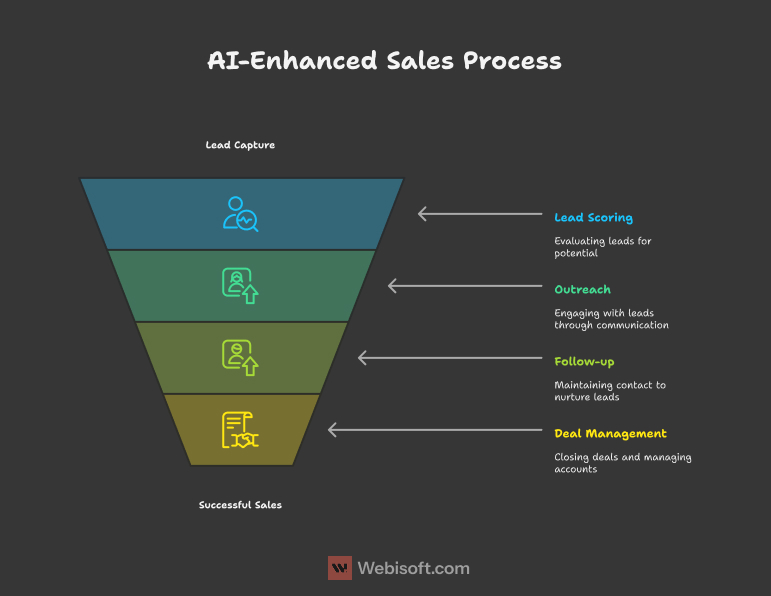
Example of an AI-Powered Sales Workflow
Picture this: A prospect fills out your online form. The AI evaluates the lead based on website activity, prior interactions, and email engagement. If the lead scores well, a personalized email is automatically sent. Follow-ups are scheduled without you lifting a finger. If there’s no response, the AI suggests a next step, whether it’s a phone call or a revised offer. This kind of automation frees up your team to focus where it counts — building real relationships and closing deals.
AI Tools for Customer Service and Support
How AI Helps Small Businesses Improve Support
Customer service is one of the biggest bottlenecks I’ve seen for small businesses. When you are managing sales, marketing, and operations, it’s no surprise that support tickets and customer questions can pile up. What I have noticed is that AI tools do not replace human support teams, but they step in where you don’t need a person. The result is faster responses, fewer missed inquiries, and a team that can focus on complex or high-touch cases rather than being stuck on repetitive tasks.
Below are a few AI tools I have either set up for clients or seen work well for small businesses across different industries.
SupportGPT — Affordable AI That Feels Personal
SupportGPT is a tool that surprised me. One of our colleague tested it on a small ecommerce site and was impressed with how well it handled basic, repetitive questions. Customers asking about shipping times, return policies, or order status received quick, natural-sounding responses. Most of the time, they didn’t even realize they were chatting with AI.
Best for: Small ecommerce shops, service businesses, or any company that gets a high volume of common customer inquiries.
Pros: Easy to train on your own FAQs, affordable pricing, and integrates with popular helpdesk platforms.
Cons: It struggles with complex or sensitive cases. You will still want a human available for escalations.
Pricing: Starts at about $19 per month for basic plans.
What I like most is how simple it is to set up. You upload your support documents or FAQs, and the AI learns quickly. There is no need for extensive configuration to get started.
Botpress — A Custom Chatbot That Adapts to Your Needs
Botpress is a tool I’ve recommended to businesses that want more control over how their chatbot behaves. It’s a good fit if you want to design workflows beyond simple Q&A. One of my clients used Botpress to build a chatbot that handled appointment booking and policy questions without needing a developer. Some coding knowledge helps, but it is not required for basic use.
Best for: Small businesses that want to build a chatbot that goes beyond standard canned responses.
Pros: Flexible, solid documentation, and a free open-source version for budget-conscious businesses.
Cons: Takes more time to set up and refine. Works best if someone on your team is comfortable with configuration.
Pricing: Free for the open-source version. Paid hosting plans start at around $50 per month.
Botpress works well for businesses that want their chatbot to guide customers through tasks before connecting them with a person.
If you’re looking for deeper custom integration of AI support into your business, exploring AI software development can help tailor a solution that fits your specific workflows and customer needs.
Where AI Fits Into Customer Support
Based on what I’ve seen, AI is at its best when it takes care of the repetitive parts of customer service. This lets your team focus on the situations that require human understanding. For example:
- AI chatbots can handle common questions any time, day or night. This keeps customers from waiting for hours or days for a reply.
- Ticket triage tools can automatically sort and prioritize issues. I have seen this cut first-response times in half for small teams.
- Helpdesk AI can suggest replies or pre-fill ticket responses, helping agents work faster without sounding robotic.
Other Tools to Consider
Depending on your needs, here are a few more tools small businesses I’ve worked with have used successfully:
- Tidio: Combines AI chatbots with live chat. This setup is great for businesses that want fast answers and an easy handoff to human agents.
- Freshdesk with AI Assist: If you already use Freshdesk, their AI features can help speed up responses with suggested replies and sentiment analysis.
Tips for Choosing the Right AI Support Tool
From experience, these are the factors that matter most:
- Focus on where your team is losing the most time. Whether that’s repetitive questions, sorting tickets, or chasing follow-ups, the best tool is the one that tackles your biggest support headache.
- Look at how smoothly the tool lets you hand off conversations to a real person. The best systems make it seamless so customers don’t feel like they’re being bounced around.
- Make sure your support content is organized. AI tools work best when they have clear material to learn from, so clean up your FAQs and policies before you train the tool.
You might also like: How to Build a Custom AI Agent
A Sample AI-Driven Support Workflow
Imagine this: A customer asks a question through your website chat. The AI answers right away if it’s something simple. If it’s more complex, the AI collects the customer’s details and issue type, then routes the request to the right person. When your agent picks it up, they already have the background info. This keeps customers happy and your team focused on work that really matters.
AI Tools for Operations and Productivity
How AI Helps Small Businesses Stay Organized
Operations and productivity may not be the flashiest areas for AI, but they are where I’ve seen small businesses get the most practical value. AI tools here don’t make headlines, but they quietly help teams stay on track, automate routine tasks, and reduce the mental load that comes with juggling multiple responsibilities. From project boards to meeting notes, these tools let small businesses work smarter without adding complexity.
Let’s take a closer look at a few tools I’ve used directly or helped clients set up successfully.
Notion AI — Smarter Notes, Tasks, and Knowledge Management
Notion has long been a favorite for keeping everything from notes to wikis in one place. When they added AI features, it became even more useful. I’ve personally used Notion AI to clean up task lists, summarize meetings, and draft outlines for proposals. What I like most is that it fits naturally into workspaces that teams are already using.
Best for: Small businesses that want one central hub for documentation, tasks, and internal knowledge with AI support to speed things up.
Pros: Clean interface, AI helps with drafting and summarizing, integrates smoothly into existing Notion workspaces.
Cons: The AI output can feel a bit generic on more nuanced topics. It’s better for organizing and summarizing than for deep creative work.
Pricing: The AI add-on runs about $8 per user per month on top of the base plan.
One client I helped used Notion AI to generate action items from meeting notes. This saved hours each month and kept the team focused on priorities.
Sembly AI — Meeting Transcription Without the Hassle
Sembly AI is one of the better transcription tools I’ve tested. It doesn’t just create a raw transcript — it highlights key decisions, action items, and important moments. For small businesses, especially those working remotely, this tool is a time-saver.
Best for: Teams that want reliable meeting transcripts, clear summaries, and follow-ups without needing someone to take manual notes.
Pros: High transcription accuracy, identifies action points, integrates with popular video call platforms like Zoom and Google Meet.
Cons: Like most transcription tools, it can stumble on unique names or technical jargon. Works best when speakers are clear.
Pricing: Free basic plan, with paid options starting around $10 per user per month.
I’ve seen Sembly AI help teams stay aligned after meetings, especially when everyone is working from different locations.
Trello with AI Features — Smarter Project Boards
Trello has been a staple for small business project management, and the AI-powered enhancements available through integrations add real value. These include features like smart due date suggestions, task prioritization, and automated reminders. I’ve set up Trello with AI add-ons for small teams that wanted something simple but effective.
Best for: Teams that like visual task boards and want light AI help to reduce manual tracking.
Pros: Familiar layout, easy for non-technical teams, AI features help keep projects moving without extra effort.
Cons: AI functions usually require add-ons or integrations, so setup takes a little more planning.
Pricing: Free plan available; paid plans with stronger automation start at about $5 per user per month.
For teams who prefer visual organization, Trello remains a top pick. AI integrations just make it more powerful.
Here’s another interesting read: How To Create Your Own AI System: 8 Key Steps To Follow
Other AI Productivity Tools to Explore
- Zapier AI: I’ve used Zapier for years to connect different tools. The new AI features help create automations from plain English prompts, which saves time when setting up workflows.
- ClickUp AI: This tool combines task management, docs, and goal setting, with AI that can draft updates, summarize progress, and suggest next steps. I’ve seen it work well for teams looking to consolidate their apps.
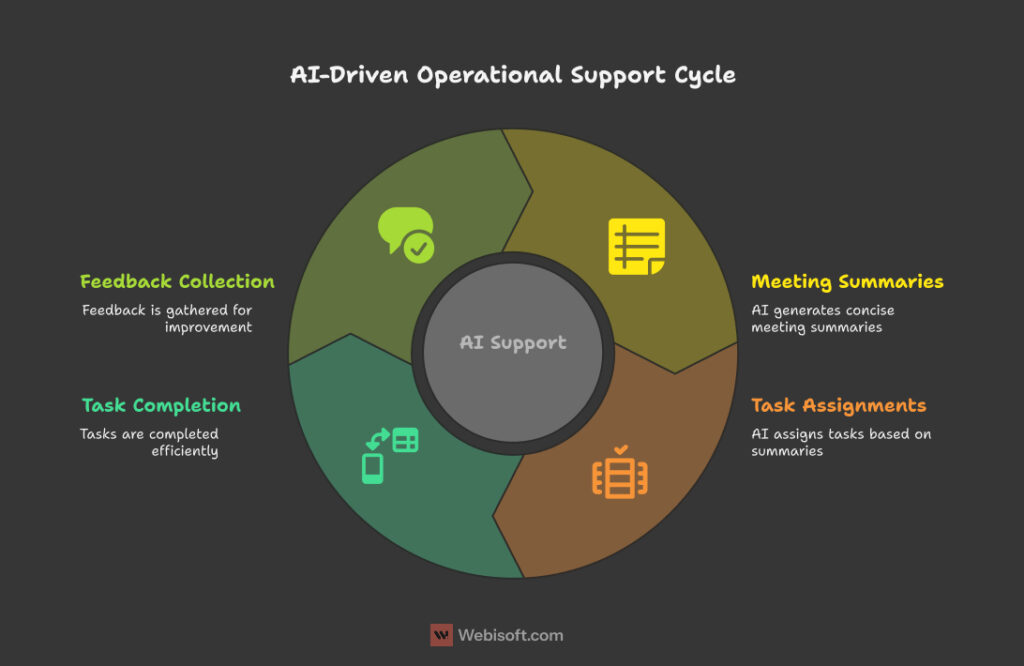
How AI Improves Productivity Without Adding Complexity
The best AI productivity tools are the ones that help you do what you’re already doing — just faster, cleaner, and with fewer mistakes. For example:
- AI transcription means you don’t have to rely on memory or rushed notes after meetings.
- AI task automation ensures no one forgets follow-ups or status updates.
- AI-powered project tools give you early warnings on what’s falling behind, so you can act before it becomes a bigger issue.
AI Tools for E-commerce and Retail
How AI Helps Small Retailers Work Smarter
Running a small e-commerce or retail business often means juggling multiple jobs at once. I’ve seen business owners switch between handling orders, updating listings, managing ads, and replying to customers — all in a single day. This is where AI tools can make a huge difference. The right solutions help you focus on growth while automating the tasks that can otherwise fall behind when sales pick up.
Let’s explore a few tools I’ve used directly or seen small businesses succeed with, and how they can fit into your workflow.
Helium 10 — AI for Amazon Sellers
Helium 10 is a tool I’ve seen Amazon sellers rely on to simplify product research, keyword tracking, and listing optimization. One client I worked with used Helium 10 to identify underserved product niches. Within weeks, their listings moved from low visibility to ranking on the first page of search results.
Best for: Small e-commerce businesses selling on Amazon who want to improve product discovery and listing performance.
Pros: Strong keyword tracking, AI-powered trend spotting, helps streamline listing creation.
Cons: Designed specifically for Amazon, so less helpful for multi-channel sellers. The wide range of features can feel overwhelming at first.
Pricing: Free limited plan available. Paid plans start at about $39 per month.
The key to getting the most from Helium 10 is taking time upfront to learn how to interpret its data so you can act on it confidently.
AI-Powered Recommendation Engines
Adding a product recommendation engine can boost your average order value with minimal effort. I’ve seen Shopify and WooCommerce stores use affordable plugins that suggest related items at checkout or in follow-up emails. One small store I worked with saw a 12% increase in cart size within the first month of using an AI-based upsell plugin.
Best for: E-commerce stores that want to grow sales through upselling and cross-selling.
Pros: Low-cost plugins, simple to install, runs in the background without needing constant updates.
Cons: The more sales data your store has, the more accurate the recommendations — newer or smaller stores might see slower results.
Pricing: Many plugins start at around $10 per month.
AI Inventory Management Tools
Inventory planning is a challenge for many small retailers. I’ve seen businesses lose sales from stockouts or tie up too much cash in unsold products. AI inventory tools like Inventory Planner or Skubana help forecast demand by analyzing sales trends, seasonality, and even external signals.
Best for: Retailers managing multiple SKUs who want smarter stock management.
Pros: Data-backed demand planning, integrates with platforms like Shopify and Amazon, helps reduce excess inventory and stockouts.
Cons: Works best with clean, consistent sales data. Initial setup takes some effort to fine-tune settings.
Pricing: Starts at about $50 per month, depending on features and volume.
How AI Fits Into E-commerce Workflows
In the businesses I’ve supported, AI worked best when owners had a clear goal — like improving ads, managing stock better, or boosting cart value. AI doesn’t replace smart decisions, but it makes it easier to see where to focus and what to improve.
AI Tools for Website and Content Creation
Where AI Fits in Small Business Website and Content Work
I’ve seen small business owners get excited about AI tools for websites and content — and I’ve also seen some get burned by over-relying on automation. AI absolutely can help you build cleaner sites and generate content faster. But in my experience, it’s most valuable when it supports your work rather than replaces your brand’s voice. Here’s a look at tools I’ve tested or recommended, with honest pros and cons.
Divi AI — Smarter Web Design for WordPress Users
If you’re on WordPress, Divi AI can be a real time-saver. I helped a friend redo their business website using Divi, and its AI features made layout suggestions, color pairings, and even generated starter copy. It sped up the build without needing design experience.
Best for: Small businesses wanting to DIY a polished website with guidance on structure and visuals.
Pros: Speeds up page design, offers modern layouts, and integrates with WordPress workflows many people already use.
Cons: The AI-generated text is generic. You’ll need to personalize it to fit your brand voice.
Pricing: Included with Divi subscriptions, starting at about $89 per year.
I see Divi AI as a helpful assistant that gives you a solid starting point — but you need to take the creative reins.
Grammarly — Essential for Clean, Polished Copy
Grammarly might not feel like high-end AI, but I use it daily. It’s great for catching typos, awkward phrasing, and tone issues. It’s especially useful when you’re producing blogs, product pages, or marketing emails and want your writing to feel clear and professional.
Best for: Any small business that produces written content and wants to keep it sharp.
Pros: Easy to use across platforms, great at highlighting common errors, helps improve clarity.
Cons: Can sometimes suggest changes that flatten your style — use it as a guide, not a rulebook.
Pricing: Free basic version; premium starts around $12 per month.
Piktochart — Quick Visuals Without a Design Team
When I’ve needed to create infographics or charts without calling a designer, Piktochart has been a go-to. Its AI features help with layout alignment and color suggestions so your graphics look balanced and professional.
Best for: Small teams creating infographics, social media visuals, or simple charts.
Pros: User-friendly templates, AI helps with spacing and alignment, lots of export options.
Cons: Limited flexibility compared to full design software.
Pricing: Free plan available; paid plans start at about $14 per month.
FlexClip — Fast Video Creation for Small Teams
Video can feel intimidating for small businesses. FlexClip helps by offering AI-supported templates, scene suggestions, and quick branding tools. I’ve seen small retailers use it for simple promos and social ads without needing editing experience.
Best for: Short promo videos, social clips, explainer videos.
Pros: Intuitive interface, good variety of templates, easy to brand.
Cons: Not designed for complex or long-form video work.
Pricing: Free version available; paid plans start at about $9 per month.
UXPilot — AI-Powered UI Design From Prompts
UXPilot is an AI tool I’ve seen gaining traction with small businesses and solo founders who want to move faster on UI design without hiring a full design team. What makes it stand out is that you can describe what you want — like “a clean landing page for a SaaS app” or “a modern ecommerce product page with filters” — and the AI generates a polished mockup. I tested it on a client’s project that needed a quick prototype for investor pitches, and it helped them create something presentable in hours, not days.
Best for: Small businesses, startups, and agencies that want to create UI mockups quickly for new sites, apps, or features.
Pros: Saves time on the early design phase, especially if you don’t have an in-house designer. The mockups are clean and follow modern UI patterns. Easy to iterate — just adjust your prompt and generate a new version.
Cons: Like any AI-generated design, you’ll likely want to refine the mockup or hand it to a designer for polish before development. It’s best as a starting point, not the final UI.
Pricing: Plans start around $29/month depending on features and usage volume.
What I appreciate about UXPilot is that it lowers the barrier for small teams to get ideas out of their head and into a visual format. For early-stage projects or MVPs, it helps you move from concept to prototype faster, so you can focus on testing and feedback.
Final Tip on AI for Websites and Content
AI can help speed up design and writing work — but in my experience, the best results come when you stay hands-on. The AI can handle the framework, but your voice, your style, and your judgment keep it authentic.
AI Tools for Distribution and Manufacturing Businesses
Why AI Matters for Small Manufacturers and Distributors
In my work with small distribution and manufacturing businesses, I often hear owners say, “We’re not a tech company — do we really need AI?” The reality is that you don’t need to transform into a tech company to benefit from AI. What I’ve seen over and over is that small businesses in this space succeed when they use AI as a quiet assistant in the background. It helps with forecasting, scheduling, and even quality checks so that you can focus on moving orders and keeping customers happy.
AI for Demand Forecasting and Inventory Planning
One small distributor I worked with struggled with constant stock imbalances. They often had too much of certain items and not enough of others. When they implemented Netstock, an AI-powered inventory management tool, they saw stockouts fall by 30% in just a few months. The AI analyzed past sales data, seasonal trends, and supplier lead times to help the team decide what to order and when.
Best for: Small manufacturers or distributors juggling many SKUs or complex supply chains.
Pros: Reduces stockouts and overstocking, improves working capital use, and provides clear recommendations.
Cons: You need clean, accurate sales and inventory data. Initial setup takes effort to get right.
Pricing: Usually starts at around $300 per month, based on business size.
AI for Predictive Maintenance
I’ve seen small manufacturers get great value from adding AI monitoring tools that track machine performance. These tools detect patterns that point to wear or failure before it happens, which helps reduce unplanned downtime. A popular example is Fiix by Rockwell Automation. This tool has become much more accessible for small operations.
Best for: Small manufacturers where equipment uptime is vital for delivery timelines.
Pros: Helps prevent surprise breakdowns, reduces maintenance costs, and integrates easily with modern equipment.
Cons: Your machinery needs to generate data for the AI to analyze. Older equipment may require sensor upgrades.
Pricing: Entry-level pricing has dropped, but costs vary depending on features and deployment.
AI for Production Scheduling and Workflow Optimization
Production scheduling is often one of the biggest headaches for small manufacturers. I’ve worked with businesses that moved from manual whiteboard planning to using AI tools like Katana MRP. These tools help figure out the most efficient job scheduling and material use to keep delivery promises on track.
Best for: Small manufacturers managing custom orders or fluctuating demand.
Pros: Smarter scheduling, better material planning, integrates with ecommerce and accounting software.
Cons: There is a bit of a learning curve, especially at first.
Pricing: Paid plans typically start at $179 per month.
Final Takeaway
AI isn’t about turning your small shop into a futuristic smart factory overnight. It’s about making better decisions with the data you already have so you can reduce waste, minimize downtime, and meet customer expectations. The small manufacturers and distributors I’ve seen succeed with AI started small — testing one tool for one process — and then expanded from there.
Comparison Table: Small Business AI Tools at a Glance
When you’re trying to choose AI tools for your small business, it’s easy to get lost in feature lists and pricing pages. I’ve found that having a simple comparison in front of you helps clarify what fits your needs — and your budget. Below is a compact table that summarizes the tools I’ve covered so far. This kind of view makes it easier to spot which tool aligns with the specific problems you’re trying to solve.
| Tool | Price Range (Starting) | Best For | Standout Features |
| Buffer | Free / $6 per channel/mo | Social media scheduling | Easy setup, basic AI post timing suggestions |
| Anyword | $39/mo | Ad copy, email subject lines | Predictive performance scoring, ad copy generation |
| Visme | Free / $12/mo | DIY marketing graphics | AI design layout suggestions, templates |
| HubSpot AI | Free / $20+/mo | Lead scoring, CRM automation | Predictive lead scoring, deal forecasting |
| Salesforce Einstein | Varies (higher-tier plans) | Advanced sales analytics | Next-best-action suggestions, predictive sales insights |
| SupportGPT | $19+/mo | Automating basic customer support | AI FAQ handling, easy helpdesk integration |
| Botpress | Free / $50+/mo (cloud) | Custom chatbot building | Flexible workflows, open-source options |
| Notion AI | $8 per user/mo (add-on) | Notes, docs, internal wikis | AI summarization, task drafting |
| Sembly AI | Free / $10+/mo | Meeting transcription and summaries | Action item detection, multi-platform integration |
| Trello (AI add-ons) | Free / $5+/mo (with power-ups) | Visual project management | Workflow automation, due date recommendations |
| Helium 10 | Free / $39+/mo | Amazon sellers, product research | AI trend spotting, keyword tracking |
| Madgicx | $49+/mo | Ad campaign optimization | Real-time ad performance AI, creative testing |
| Katana MRP | $179+/mo | Small-scale manufacturing scheduling | AI-driven job scheduling, material planning |
| Netstock | ~$300+/mo | Inventory forecasting for distributors | Demand forecasting, purchase recommendations |
Note: Prices shown are starting tiers and may vary based on your plan size, features, or usage level.
In my experience, no table can tell you exactly what’s best, but it’s a great tool for narrowing your options. I always suggest picking two or three tools to trial before making a final decision.
Key Challenges & Ethical Considerations When Using AI in Small Business
Understanding the Real Risks of AI Adoption
I am a huge believer in what AI can do for small businesses. That said, I have seen how easy it is to get swept up in the excitement and overlook the risks. When I started exploring AI tools myself, I assumed they were more objective and reliable than they really are. That is not always the case. Even with simple AI-powered tools, small businesses need to pause and think about the challenges and responsibilities that come with using them.
Data Privacy: Who Has Access to Your Business Data?
Every AI tool processes data in some form. Whether that means customer emails, order details, or internal documents, that data has to go somewhere. I have seen business owners get surprised when they realize their tool stores data in ways they did not expect or share it for purposes they did not consent to.
What you can do to protect your data:
- Read and understand the tool’s privacy policy. Check where data is stored, how it is processed, and whether third parties have access.
- Ask if your data is used to train the AI model. Some vendors use client data to improve their systems, which might not align with your privacy standards.
- Choose tools that clearly document their security practices. Look for encryption, GDPR compliance, and defined data retention timelines.
Bias in AI: The Patterns You Don’t See
AI systems learn by analyzing data. The problem is that data often carries hidden biases, and the AI can repeat or amplify those patterns. I have seen small businesses run into trouble when AI scoring tools undervalued great leads or produced messaging that felt off-brand because of flawed training data.
How to minimize this risk:
- Always review AI suggestions critically. Don’t take them at face value.
- Provide feedback where possible. Many AI tools allow you to rate or correct outputs, helping them learn better over time.
- Test messaging or recommendations across different customer segments to avoid misfires.
Avoiding Over-Reliance: AI Is an Assistant, Not a Boss
It can be tempting to hand over decision-making to AI when you are busy, but I have seen businesses get burned by trusting AI-generated reports, forecasts, or content without review. AI can speed up work, but it is not a replacement for judgment.
Best practices:
- Let AI handle drafts, summaries, or initial analysis, but always build in human review before decisions are finalized.
- Spot-check AI outputs, especially when they affect customers or budgets.
- Train your team so they understand the tool’s limits. When your staff knows what AI can and can’t do, they use it more effectively.
Transparency: Let Customers Know When AI Is Involved
In customer service especially, transparency about AI goes a long way. Customers appreciate knowing whether they are interacting with a person or an automated system. I have seen businesses earn better trust scores simply by being upfront.
A simple best practice: Include messaging like “This response was generated by our assistant to help you faster — a human is ready to assist if needed.” It reassures customers that they are not being ignored.
Final Thought: Build AI Into a Responsible Workflow
The small businesses that see real success with AI are the ones that integrate it thoughtfully. They use AI to save time, spot patterns, and assist — but they keep people in charge of the important calls. Building in checks, training, and clear processes helps AI become a partner rather than a liability.
How to Successfully Integrate AI Tools into Your Workflow
Why Planning Your AI Integration Matters
One of the biggest mistakes I have seen small businesses make with AI is rushing into it without a clear plan. The appeal of automation is strong. You are juggling so much already, so the idea of hitting “go” on an AI tool and watching it take over is tempting. But I have watched businesses go from hopeful to frustrated because they introduced AI too quickly and without structure. The key is to approach AI as part of your overall workflow — not as a bolt-on solution. Here is a practical process I have used and recommended to help small businesses integrate AI without unnecessary headaches.
1. Start With a Clear Problem to Solve
Before you even think about picking a tool, ask yourself where you really need help. Is it customer email overload? Is social media content falling behind? Are you struggling to keep inventory balanced? I have seen too many teams waste time (and budget) because they chose a tool first, then tried to find a problem for it to solve.
Tip: Make a short list of your biggest daily or weekly bottlenecks. Focus your AI search on addressing those specific points before exploring add-ons. This focused approach is something we emphasize in our AI consulting services because it saves time and delivers results faster.
2. Run a Small Pilot Project
Once you know what problem to target, test the tool in a controlled way. Start small, so you can learn without risking disruption. For example:
- Let an AI chatbot manage just after-hours inquiries at first.
- Use AI to draft internal communications before it touches customer-facing content.
- Apply AI-driven inventory predictions to one product category before scaling it across your full catalog.
Small pilots give you breathing room. You can see how the AI fits into your flow, spot quirks early, and make adjustments without big consequences.
3. Train Your Team and Involve Them Early
This is a step I see small businesses skip, and it always costs them. People can get anxious about AI. Some worry it will replace jobs, others fear it will add complexity. What I have found is that AI works best when the team feels part of the process.
- Show how the tool makes their work easier, not harder.
- Take advantage of tutorials and onboarding guides from the vendor.
- Set clear boundaries: what the AI handles and where human oversight stays essential.
A little training goes a long way. I have seen teams go from wary to enthusiastic once they see AI as a helper, not a replacement.
4. Integrate AI Gradually With Your Existing Systems
Do not try to change everything overnight. It is better to add AI to the systems that are already working. If your CRM, ecommerce platform, or task manager runs smoothly, start by layering AI into those areas. That way, the AI feels like an upgrade rather than a disruption.
Tip: Make a checklist of your core software tools. When evaluating AI, verify that it integrates well with what you are already using. That simple step can save you from major headaches later.
5. Measure ROI and Be Ready to Adjust
AI feels exciting at first, but it is important to check that it is actually helping. I always recommend tracking metrics from the start so you know what is improving. One client I worked with reduced their average support response time by over 40% after adding an AI chatbot. They were able to prove the tool’s value with hard numbers.
Ways to measure impact:
- Track how much time you or your team spend on tasks before and after using the AI tool.
- Monitor customer feedback scores or support response times.
- Check for a drop in errors or missed tasks.
Do not hesitate to adjust or swap out a tool if it is not delivering. AI works best when you tune and refine its role over time.
Final Thought
The small businesses I have seen succeed with AI are the ones that view it as a tool to enhance their existing strengths. They do not expect it to be a magic fix. Instead, they start small, stay engaged, and build on what works.
Case Studies: Small Businesses Winning With AI
Real-World Examples of AI Done Right
Sometimes the clearest way to understand what AI can do for a small business is through real stories. I have worked with, advised, or closely followed small businesses that started with a single AI tool to solve a specific challenge. These examples show how AI can deliver real impact without huge budgets or technical teams.
1. Local Retailer Boosts Sales With AI Recommendations
A small home goods shop I worked with had both a physical store and a modest Shopify site. They had steady traffic online but struggled to increase the average cart size. We helped them add a simple AI product recommendation plugin to their store. The AI suggested related items at checkout and in follow-up emails.
AI tool used: Shopify AI product recommendations plugin
What changed: The AI automatically suggested bundles and complementary items. The owner did not have to manually curate product pairings anymore.
Results: In about six weeks, their average cart value increased by 15 percent. They also noticed a rise in repeat customers who came back for suggested products they had not seen during their first visit.
Lesson learned: The owner shared that they wished they had started using AI recommendations earlier. It was an affordable tool that delivered value fast and required very little setup time.
2. B2B Services Agency Saves Time With Notion AI
A small marketing agency I know, with a team of eight, was losing hours every week writing meeting notes, drafting proposals, and updating internal documentation. They integrated Notion AI into their existing workspace. The AI helped draft meeting summaries, outline proposals, and clean up messy internal pages.
AI tool used: Notion AI
What changed: Instead of starting from scratch, the team had a first draft ready for review. They could focus on polishing and tailoring content, rather than spending hours drafting.
Results: The agency estimated saving eight to ten hours per week across the team. That time went straight into billable client work rather than admin tasks.
Lesson learned: The owner highlighted the importance of setting clear rules on where to use AI. This kept the quality high while still enjoying the time savings.
3. Small Manufacturer Prevents Downtime With AI Maintenance
A family-owned manufacturing business I consulted added AI-powered predictive maintenance to their equipment monitoring system. The AI flagged abnormal vibration patterns on a key machine. This helped them identify a part on the verge of failure, before it caused a breakdown.
AI tool used: AI module within their machine monitoring system (comparable to Fiix)
What changed: They shifted from reacting to breakdowns to scheduling repairs ahead of time.
Results: The business avoided more than $5,000 in lost production that would have resulted from unplanned downtime.
Lesson learned: Even basic AI features inside existing tools can provide big savings and prevent disruptions when used thoughtfully.
The common thread in these stories is that none of these businesses tried to overhaul everything at once. They started by using AI to solve one clear problem, whether it was increasing sales, saving admin time, or avoiding downtime. This targeted approach is where I have seen small businesses succeed. If you are exploring AI, the smartest move is to start small, focus on real needs, and build from there.
FAQs about AI Tools for Small Businesses
I get these kinds of questions a lot when small business owners are exploring AI for the first time. It’s smart to ask — AI is a big topic, and it’s easy to get overwhelmed. Here’s what I tell people based on real experience helping small businesses put AI to work without the stress.
What is the most affordable AI tool for small businesses?
There are plenty of AI tools out there that won’t break the bank — or that you can even start using for free. I’ve seen small teams get real value from:
- Buffer (Free plan) — Great for basic social media scheduling with light AI help for timing posts.
- Grammarly (Free version) — A solid writing assistant that catches typos and awkward phrasing.
- Trello (Free with automation basics) — You can add simple AI-powered task automations without needing to pay right away.
- Notion AI (Affordable add-on) — At $8/month per user, it’s one of the most cost-effective AI writing and organizing tools I’ve seen.
The key is to match the tool to your need — even a free plan can deliver big value if it helps solve the right problem.
Are AI tools difficult to implement in a small business?
This is a fair concern, but in my experience, most modern AI tools are built for non-technical users. The tools that work best for small businesses come with easy setup guides, templates, and integrations with software you probably already use (like Shopify, Slack, or Google Workspace).
I always recommend starting with a small pilot — let the AI handle a narrow task at first. That way you can learn as you go, without trying to overhaul everything at once.
Can AI tools replace employees in a small business?
I get this question a lot, and I always give the same honest answer: AI is best at supporting your team, not replacing it. What I’ve seen work is human-AI collaboration — let AI handle repetitive tasks, like scheduling, drafting, or sorting, so your people can focus on judgment, creativity, and customer relationships.
When AI is used thoughtfully, it frees up your team’s time rather than making them feel like they’re competing with a machine.
How can I ensure data privacy when using AI tools?
Data privacy matters, no matter how small your business is. I always advise:
- Read vendor privacy policies carefully. Make sure you understand how they store and use your data.
- Ask whether your data is used to train their models. Some vendors keep your data private, while others might use it in ways you’re not comfortable with.
- Stick with tools that offer encryption and meet standards like GDPR.
- Limit what you feed into AI. If you don’t want sensitive data out there, don’t put it in.
A little due diligence upfront can save a lot of headaches down the road.
Conclusion: The Future of AI in Small Business
If there is one thing I have seen consistently, it is that AI is no longer just for large corporations. Small businesses are adopting AI right now in ways that are practical and effective. The tools they use might not make headlines, but they help save time, reduce costs, and give smaller players a chance to stay competitive. Whether it is answering customer questions faster, drafting content, managing inventory, or scheduling social media posts, AI has become part of the small business toolkit. And the best part is that these tools are becoming more affordable and easier to use every year.
What truly sets successful businesses apart is their mindset. The small companies that get the most value from AI are the ones that take a thoughtful, measured approach. They choose one area where AI can make a difference, run small tests, and see how it fits into their daily work. They do not expect AI to fix every challenge overnight. Instead, they treat it as what it really is — a tool that helps them work smarter, not a magical solution.
Another important lesson is the value of staying curious. AI technology moves quickly. The tools you rely on today could look very different a year from now. I always encourage small business owners to keep exploring. Take advantage of free trials, test new platforms, ask tough questions about privacy and data security, and be ready to adjust your approach as you learn what works best.
The future of AI for small business is not about replacing people. It is about using technology to support your team and enhance what you already do well. The tools are here now, and they are more accessible than ever. The key is to start small, stay engaged, and grow from there.
