AI agents are moving out of research demos and into production systems that work support queues, reprice inventory, and screen transactions without waiting for a human to click a button. For a business, the useful question is not whether the technology is impressive. It is which jobs an agent can take over reliably, and what it costs to run one safely.
This guide covers ten AI agents examples that companies already run in production, explains how an agent works under the hood, and lays out the trade-offs to weigh before building one. The most common categories are:
- Customer-service triage agents
- Lead-management and qualification agents
- Dynamic-pricing engines
- Fraud-detection agents
- Predictive-maintenance monitors
Every one of them follows the same loop: ingest data, decide on a next step, act through tools or APIs, and learn from the outcome.
What Are AI Agents
An AI agent is a software system that pursues a goal autonomously. It perceives its environment through data feeds and APIs, decides what to do next, acts on external systems, and adjusts its plan as results come back. You define the objective; the agent works out the steps.
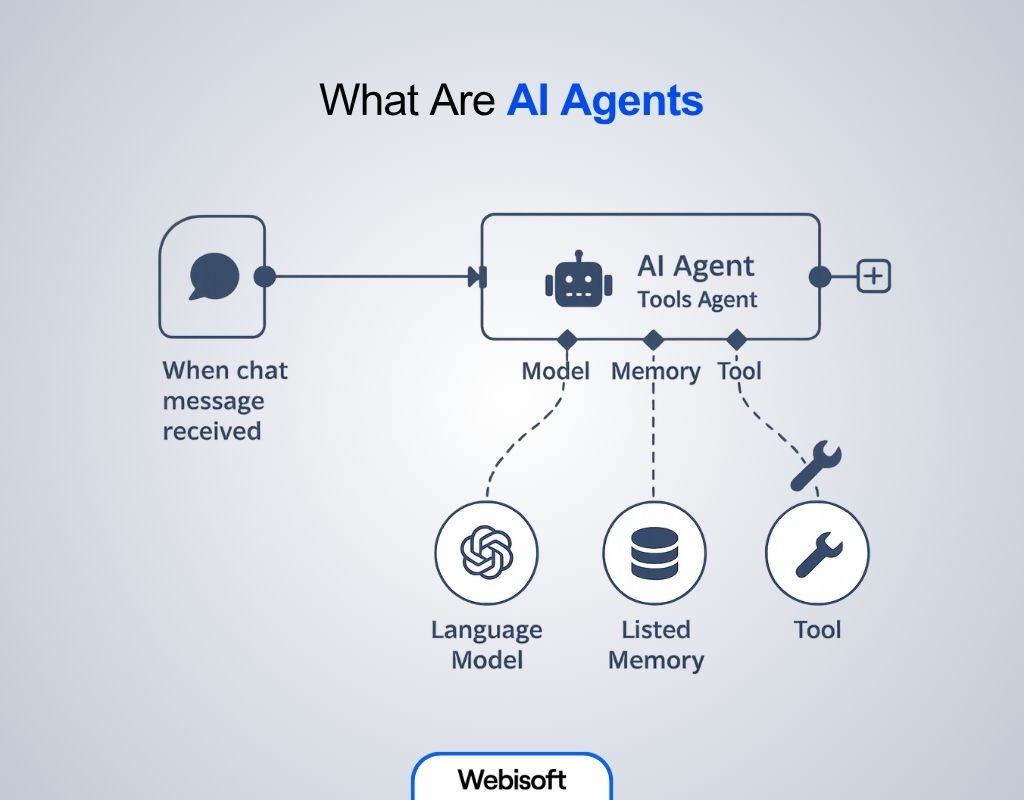
The idea is not new. The intelligent agent has been a core abstraction in AI research for decades. What changed recently is the reasoning engine: large language models can now interpret ambiguous instructions, read unstructured data, and plan multi-step work, so agents no longer depend on hand-coded rules for every situation.
How AI Agents Differ from Ordinary AI and Chatbots
People often use "AI agent" and "chatbot" interchangeably. They are different systems with different failure modes, and picking the wrong one is an expensive mistake.
A chatbot is a conversational interface. It follows predefined flows or answers one prompt at a time, and it cannot choose its own next step. An AI agent is goal-driven software: it combines a reasoning model with tool access, memory, and planning, and it keeps working until the goal is met or a guardrail stops it. The differences in practice:
| Dimension | AI Agent | Chatbot |
|---|---|---|
| Core purpose | Achieve a defined goal end to end by planning, deciding, and acting | Hold a conversation and return scripted or model-generated answers |
| Autonomy | Proactive; can trigger itself, choose tools, and revise plans mid-task | Reactive; responds only when a user sends a message |
| Decision-making and planning | Multi-step reasoning; evaluates options and builds action sequences | Fixed dialogue trees or single-turn intent matching |
| Tool and system access | Calls APIs, databases, code, or other agents to change external state | May query limited integrations, and only on user request |
| Learning and adaptation | Feeds outcomes back into memory and adjusts strategy over time | Little self-improvement; relies on manual updates |
| Typical use cases | IT ticket resolution, supply-chain optimization, autonomous reporting | FAQ answering, appointment booking, first-line support |
| Interaction model | May converse, run silently in the background, or coordinate with other agents | The chat window is the product |
| Main risk | Needs guardrails, scoped permissions, and monitoring to stay on task | Breaks when queries fall outside scripted paths |
Choose a chatbot for repetitive dialogue: FAQs, bookings, simple support. Choose an agent when the goal spans multiple steps, requires decisions, and touches external systems. Chatbots talk; agents act. For a deeper treatment of the distinction, see our guide to understanding AI agents.
How Do AI Agents Actually Work
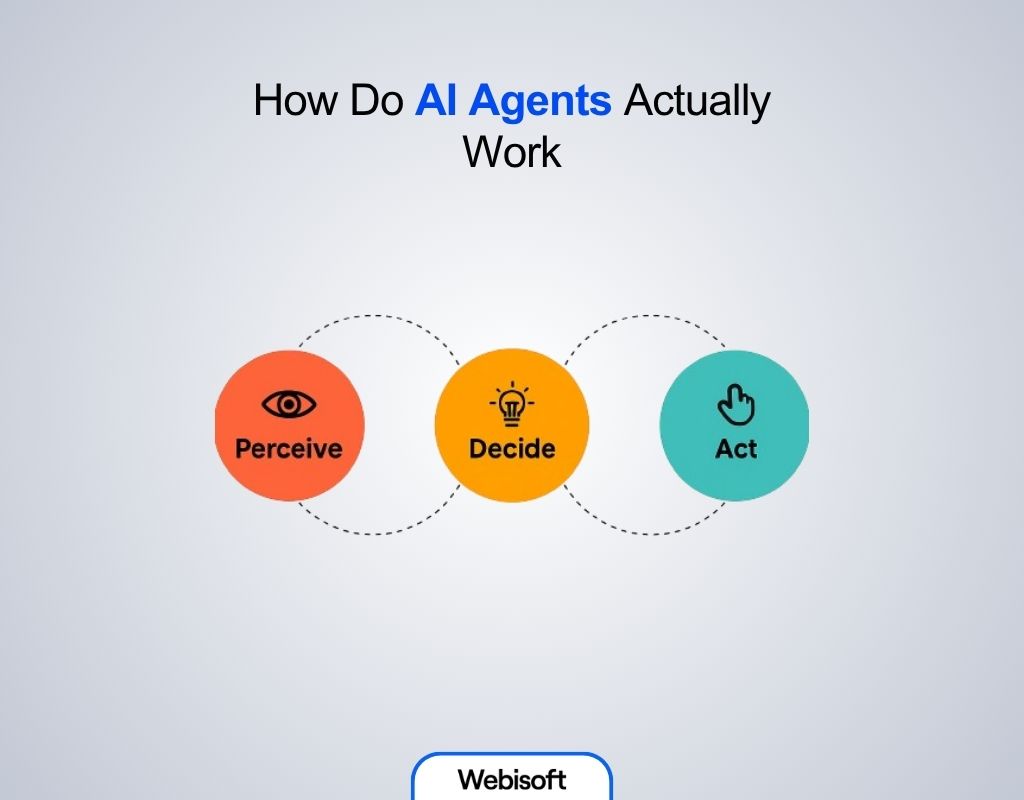
Under the hood, most production agents run the same four-stage loop. Each cycle moves the state of the world one step closer to the goal:
- Perception. The agent collects input from APIs, sensors, logs, documents, or user messages, and normalizes it into a working context.
- Reasoning and planning. A model, usually an LLM, interprets the context, breaks the goal into subtasks, and selects the next action. Good implementations force the model to state its reasoning before acting, which makes plans auditable.
- Tool calling and action. The agent invokes external tools: REST APIs, database queries, code execution, or other agents. This is where permissions matter most. A well-designed agent holds the narrowest credentials that still let it do its job, and destructive operations require explicit approval.
- Learning and memory. Outcomes, corrections, and past interactions are stored, often in a vector database, so the agent retrieves relevant history on the next run instead of starting cold.
The engineering work that separates a demo from a dependable system sits around this loop, not inside it. Production teams add guardrails that block out-of-scope actions, evaluation suites that score the agent on known cases before every release, human-in-the-loop checkpoints for high-stakes decisions, and cost controls, since an agent that loops on a hard problem can burn through model tokens quickly. Latency is the other constraint: each reasoning step adds seconds, so time-critical paths like fraud scoring typically pair a fast statistical model for the instant decision with an LLM layer for investigation and explanation.
Types of AI Agents
Agent architectures fall into two layers: behavioral designs, which describe how a single agent makes decisions, and structural designs, which describe how agents are organized. The table below summarizes both; there is a full breakdown in our article on the types of AI agents:
| Layer | Agent type | Core idea | When to pick it |
|---|---|---|---|
| Behavioral (internal decision style) | Simple reflex | Hard-coded IF/THEN rules; no memory | Fully observable, stable environments |
| Model-based reflex | Maintains an internal world model to infer unseen facts | Partially observable environments | |
| Goal-based | Searches for action sequences that reach a goal | Tasks with alternative paths | |
| Utility-based | Ranks goal-reaching options with a utility function | Trade-off scenarios, such as price versus speed | |
| Learning | Improves its own rules or utility function from experience | Dynamic, data-rich domains | |
| Structural (how agents are organized) | Hierarchical | A high-level agent sets subgoals for lower layers | Complex, multi-scale tasks |
| Multi-agent system | Several specialized agents cooperate or compete | Distributed problems that exceed one agent's scope |
10 Real-World AI Agents Examples for Businesses
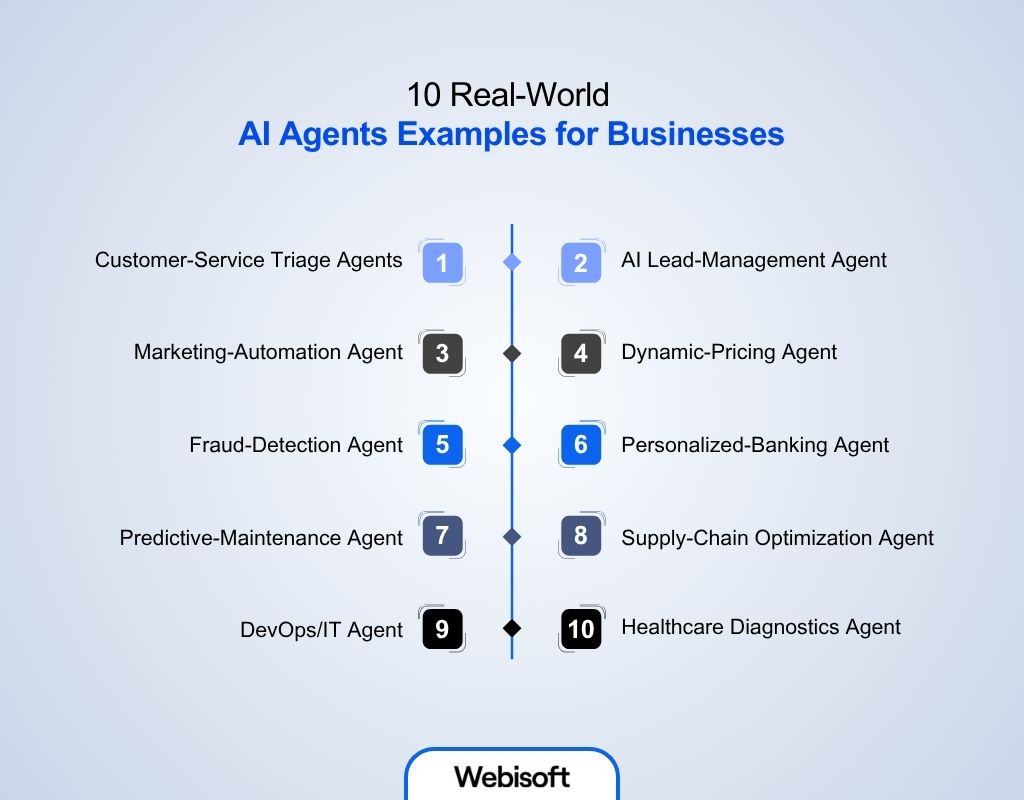
The following ten agents already run in support desks, pricing engines, trading floors, and factories. For each, we cover what it does, how it works mechanically, and what to know before deploying one.
1. Customer-Service Triage Agents
A triage agent sits in front of the support queue. It reads every email, chat, and voicemail, classifies intent and urgency, pulls the customer's order history and CRM notes, and either drafts a response for a human to approve or routes the case to the right specialist. Multi-agent setups extend this so a resolution agent handles routine cases fully, while the triage layer escalates anything ambiguous.
Typical capabilities:
- Auto-classify inquiries by intent and urgency
- Pull order history and CRM context into the case
- Prioritize VIP and time-sensitive tickets
- Draft answers for human review on complex cases
- Escalate edge cases to specialists with full context attached
What to know before deploying: the payoff is handling-time reduction on repetitive tickets, but the risk profile is customer-facing. Start with draft-and-approve mode, measure deflection accuracy on your own historical tickets, and only remove the human check on intents where the agent's answers hold up.
2. AI Lead-Management Agents
A lead-management agent responds to inbound calls, texts, and chats around the clock, enriches each record with firmographic and behavioral signals, scores the lead, and books qualified prospects directly onto a rep's calendar. Speed is the entire value proposition: inbound leads go cold within hours, and an agent responds in seconds regardless of time zone.
Typical capabilities:
- Respond to SMS, calls, and chat 24/7
- Enrich CRM records with firmographics and intent signals
- Score and segment leads by fit and likelihood to buy
- Schedule demos and calls on rep calendars automatically
- Flag high-value leads for immediate human outreach
What to know before deploying: the agent is only as good as the qualification criteria you encode. Define what a sales-ready lead looks like with your revenue team first, or the agent will book meetings your reps do not want.
3. Marketing-Automation Agents
A marketing-automation agent runs campaign execution across channels from one control plane. It drafts posts and email sequences, segments audiences dynamically, schedules publishing for peak engagement windows, runs A/B tests on subject lines and creatives, and reallocates budget toward what performs. Platforms in this category, such as Albert, have been used by consumer brands to automate audience and creative testing at a scale no human team can match manually.
Typical capabilities:
- Generate social posts, email copy, and ad variations
- Segment audiences and update lists dynamically
- Schedule content for peak engagement windows
- A/B test subject lines, creatives, and CTAs continuously
- Shift budget toward winning variants in near real time
What to know before deploying: autonomous budget reallocation needs spend caps and brand-safety rules from day one. Give the agent a sandbox budget before handing it the full account.
4. Dynamic-Pricing Agents
A dynamic-pricing agent adjusts prices in real time to balance revenue, margin, and competitive position. It ingests demand signals, inventory levels, and competitor prices, forecasts short-term demand by region and time of day, and computes the price that maximizes the target metric within guardrails you set. Uber's surge pricing is the most visible consumer example of the pattern: price responds to real-time supply and demand rather than a fixed schedule.
Typical capabilities:
- Monitor stock levels and sell-through continuously
- Track competitor prices and promotions
- Forecast demand by region and time window
- Compute optimal prices against margin floors
- Trigger promotions when demand softens
What to know before deploying: set hard floors and ceilings. Unbounded pricing agents can chase competitors into margin-destroying spirals or price so aggressively that customers notice and churn.
5. Fraud-Detection Agents
Instead of waiting for chargebacks, a fraud-detection agent scores every transaction the moment it hits the payment gateway. It cross-checks device fingerprints, IP reputation, geolocation, and the customer's behavioral history against learned fraud patterns, then approves, blocks, or routes the transaction for manual review, all within the latency budget of a checkout flow. Because fraud tactics evolve, these agents retrain continuously on confirmed outcomes. Payment providers such as Stripe expose this capability through their APIs, so smaller merchants get the same class of protection as large processors.
Typical capabilities:
- Score each transaction for risk within milliseconds
- Cross-validate device, geolocation, and behavior signals
- Catch card testing, account takeover, and mule networks early
- Retrain continuously as fraud tactics shift
- Auto-block or escalate suspicious transactions for review
What to know before deploying: the metric that matters is not just fraud caught but false positives avoided. Every legitimate transaction you block is lost revenue and an annoyed customer, so tune thresholds against both sides of the error.
6. Personalized-Banking Agents
A personalized-banking agent acts as an in-app financial assistant. It classifies each customer's transactions, spots unusual spending, predicts upcoming cash-flow crunches, and surfaces savings or budgeting recommendations at the moment they are relevant. Royal Bank of Canada's NOMI is a production example: it analyzes transaction patterns and pushes personalized insights and automated savings directly inside the banking app.
Typical capabilities:
- Classify transactions and flag unusual spend patterns
- Recommend savings plans, budget adjustments, or debt-payoff paths
- Pre-qualify users for loans or credit offers
- Streamline onboarding, KYC, and identity checks
- Deliver context-aware nudges in app or by email
What to know before deploying: financial advice is regulated territory. Recommendations need explainability and an audit trail, and anything that moves money automatically needs explicit customer consent and conservative limits.
7. Predictive-Maintenance Agents
A predictive-maintenance agent replaces calendar-based servicing with condition-based servicing. It streams vibration, temperature, and power readings from equipment sensors, detects the early signatures of component wear, estimates remaining useful life, and then acts: it books the work order, reserves the spare part, and schedules the technician for the least disruptive window. Industrial vendors including Siemens and Augury ship this pattern on top of existing PLC and sensor infrastructure.
Typical capabilities:
- Analyze real-time vibration, temperature, and output metrics
- Detect early signatures of component fatigue
- Estimate remaining useful life with statistical and ML models
- Recommend maintenance windows that minimize disruption
- Auto-generate work orders and order replacement parts
What to know before deploying: the model needs months of sensor history that includes real failures to learn from. Budget for an instrumentation and data-collection phase before expecting predictions you can act on.
8. Supply-Chain Optimization Agents
A supply-chain agent watches demand, inventory, and logistics signals across the network and intervenes continuously: it forecasts SKU-level demand, rebalances stock between warehouses before stockouts happen, picks carriers per shipment on cost and reliability, and reroutes orders when a port closure or weather event disrupts a lane. The advantage over traditional planning software is reaction time, since the agent replans in minutes instead of waiting for the weekly cycle.
Typical capabilities:
- Predict SKU-level demand weeks ahead
- Rebalance inventory across warehouses preemptively
- Select carriers per shipment on cost and reliability
- Reroute orders in real time around disruptions
- Feed volume and performance data into rate negotiations
What to know before deploying: integration is the hard part. The agent needs live, trustworthy feeds from ERP, WMS, and carrier systems; if the underlying inventory data is stale, the agent automates bad decisions faster.
9. DevOps and IT Agents
A DevOps agent automates the delivery pipeline. It reviews pull requests for bugs and vulnerabilities, generates unit and integration tests, builds and deploys artifacts, orchestrates canary or blue-green releases, and watches post-deployment metrics so it can roll back automatically when error rates climb. This is one of the most measurable agent categories: GitHub's own controlled study found developers completed a coding task 55% faster with Copilot than without it.
Typical capabilities:
- Scan pull requests for defects and vulnerabilities
- Generate unit, integration, and regression tests
- Build and deploy artifacts across environments
- Orchestrate canary, blue-green, or rolling releases
- Monitor post-deploy metrics and roll back on regressions
What to know before deploying: agent-generated code and tests still need review gates. The productivity gain comes from removing toil, not from removing engineering judgment.
10. Healthcare Diagnostics Agents
A diagnostics agent aggregates EHR notes, lab results, imaging, and live vitals into a single patient view, flags anomalies such as early sepsis indicators, ranks patients by risk on clinician dashboards, and attaches evidence citations to every suggestion. The design goal is decision support, not replacement: the agent compresses the time a clinician spends assembling the picture, and the clinician makes the call.
Typical capabilities:
- Aggregate labs, notes, imaging, and vitals into one view
- Detect early sepsis, stroke, or oncology indicators
- Rank patients by risk on clinician dashboards
- Suggest diagnostic tests and treatments with supporting evidence
- Alert care teams through secure mobile or EMR channels
What to know before deploying: healthcare agents face the strictest bar of any category: clinical validation, regulatory clearance, and HIPAA-grade data handling. Expect a longer path to production and design the audit trail in from the start.
Who Needs AI Agents
You do not buy a bulldozer to plant tulips. Agents pay off when the job is high-volume, multi-system, and constantly changing; for anything smaller, a script or a chatbot is cheaper to build and easier to maintain. The situations where an autonomous agent earns its cost:
- High-volume service desks drowning in repetitive tickets
- Operations teams juggling data across multiple external systems
- IT departments automating routine fixes and release toil
- Logistics and supply-chain planners who need real-time rerouting
- Manufacturers moving from scheduled to predictive maintenance
- Revenue teams where minutes of response delay cost deals
A useful screening test: if a competent employee could write down the decision rules for the job in an afternoon, automate it with conventional software. If the rules change weekly and the inputs are messy, that is agent territory.
Want to Build an AI Agent? How Webisoft Helps You
Building an agent that survives contact with production takes more than wiring an LLM to an API. It takes scoped permissions, evaluation suites, memory design, and integration with the systems the agent has to act on. Webisoft is a Montreal-based full-cycle software development firm, and our AI development services cover that full path:
- Strategic AI consulting to identify the highest-impact agent opportunities in your workflows
- Custom model and agent development targeted at specific operational pain points
- Integration of agents into your existing tools, data pipelines, and approval flows
- Advanced capabilities: predictive analytics, document search, and multimodal handling of text, voice, and images
- LLM and RAG solutions, including fine-tuned models and retrieval-augmented assistants grounded in your own data
- Continuous monitoring, evaluation, and optimization after launch
- Security and compliance engineering for standards such as GDPR and HIPAA
From Examples to a Working Agent
The pattern across all ten examples is consistent: perceive, reason, act, learn. The businesses getting value from agents did not start with the technology; they started with a job that was high-volume, rule-resistant, and expensive to staff, then scoped an agent tightly around it. You can see how these systems perform end to end in our roundup of real-world AI agent projects.
Start the same way. Pick one workflow, define what success looks like in numbers you already track, map the data and tools each step needs, and decide whether a single agent or a multi-agent chain fits. Run it with a human in the loop until the error rate earns autonomy. When you are ready to build, contact Webisoft and we will scope it with you.
A chatbot is a conversational interface that responds to one prompt at a time and follows predefined flows. An AI agent is goal-driven software that plans multi-step work, calls external tools and APIs, keeps memory of past outcomes, and acts autonomously until the goal is met. Chatbots talk; agents act on external systems.
The categories with the most production deployments are customer-service triage, lead management and qualification, dynamic pricing, fraud detection, predictive maintenance, supply-chain optimization, and DevOps automation. All of them share the same profile: high volume, messy inputs, and decision rules that change too often for conventional software.
Production agents run a four-stage loop: perception (collect data from APIs, sensors, or documents), reasoning and planning (a model breaks the goal into subtasks and picks the next action), tool calling (the agent acts on external systems through APIs), and learning (outcomes are stored in memory to improve future runs). Guardrails, scoped permissions, and human approval checkpoints sit around this loop in any serious deployment.
If a competent employee could write down the complete decision rules for the job in an afternoon, conventional software or a simple chatbot is cheaper to build and easier to maintain. Agents earn their cost only when the work is high-volume, spans multiple systems, and involves rules or inputs that change constantly.
It depends on the category. A draft-and-approve support triage agent on top of an existing helpdesk can reach a supervised pilot in weeks. Predictive maintenance needs months of sensor history that includes real failures before its predictions are trustworthy, and healthcare agents add clinical validation and regulatory clearance on top. The reliable path in every case is the same: launch with a human in the loop and expand autonomy as the measured error rate earns it.
