You and I both know LLMs are not just a model. In the enterprise, they are a stack, a program, and a promise you will be measured against. Security, latency, unit costs, and outcomes all matter at once. I have shipped and repaired enough AI features across blockchain, SaaS, and data heavy backends to see where teams stall. Benchmarks are vague. Governance is fuzzy. Scaling past the pilot lacks a plan.
This guide is the playbook I want on every desk. You get a deployment decision matrix, a simple cost model you can plug in, a practical evaluation protocol that predicts production behavior, and a clean 90 day rollout plan. We will choose RAG or fine tuning with clear thresholds, set guardrails and observability, and go line by line on contract and SLA must haves.
What Counts as an Enterprise LLM Today
Most teams start by asking which model to use. In practice, the decision is about the platform around the model and the operating discipline that keeps it safe and useful. An enterprise LLM is three things working together.
First, a model or a small set of models chosen for your tasks. Second, a platform that handles identity, policy, evaluation data, logging, and secure data access. Third, an operating program that sets standards and owners, then reviews changes before they hit production.
Enterprise grade means you can answer a few simple questions. Who can prompt or call which capability, and how do you audit that access. Where does data live, and what is the retention policy. What happens when a jailbreak or prompt injection lands in your system. How do you track quality, latency, and cost over time. Which red flags trigger a rollback. If those answers are unclear, you do not have an enterprise LLM yet. You have a pilot.
Treat the model as a replaceable component. Your guardrails, retrieval layer, and evaluation datasets should not break when you swap a model or add a domain specific adapter. Favor boring, well labeled interfaces. Favor explicit policies over tribal knowledge. Put human review where it changes outcomes, not as a checkbox after the fact.
The result is a stack you can evolve with less drama and more trust. That is the standard your stakeholders expect, and it is the only way the system survives contact with real users.
You might also like to read: Multimodal AI in Healthcare: Use Cases and 2025 Trends
Market Outlook, Adoption Signals, and Budget Realities
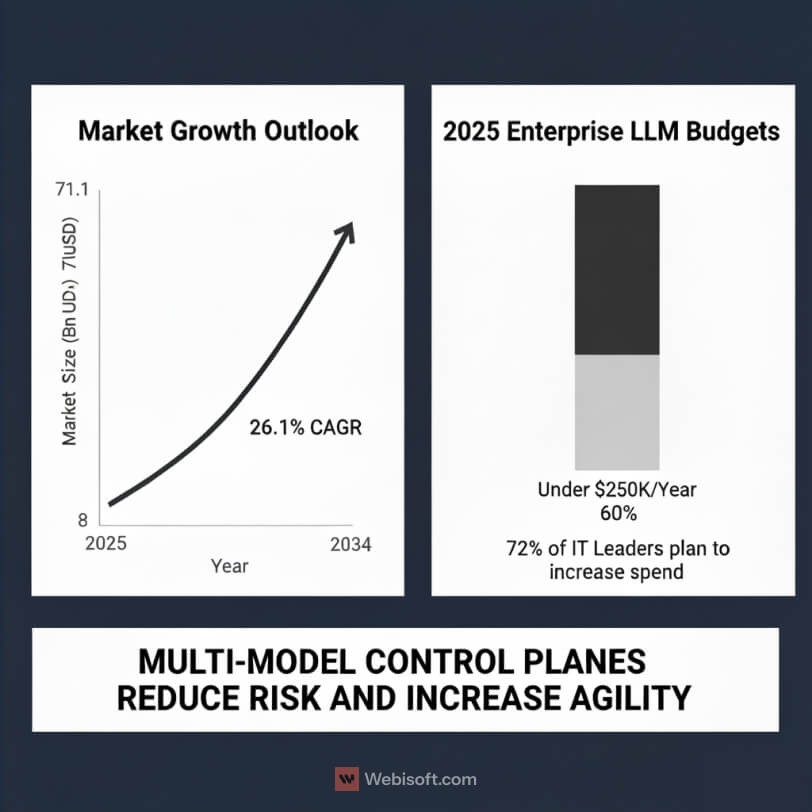
The market is not warming up. It is accelerating. According to Global Market Insights, enterprise LLM spend is projected to grow from 8.8 billion dollars in 2025 to 71.1 billion dollars by 2034, a 26.1 percent CAGR. Large enterprises are set to drive 54 percent of that spend in 2025, which aligns with what we see in multi-year platform deals and data residency reviews.
Budgets reflect real intent rather than curiosity. Market.US reports that 72 percent of enterprise IT leaders plan to increase LLM spending in 2025, and nearly 40 percent already allocate more than 250,000 dollars per year to enterprise LLM services and integration. In practice, that level of funding usually covers one production-grade use case, a shared retrieval layer, and the observability stack needed to pass an audit.
Vendor adoption is broad enough to assume heterogeneity. Early 2025 survey work shows Google models in use at 69 percent of enterprises and OpenAI at 55 percent. Most teams are not picking a single winner. They are assembling a portfolio that changes by use case, latency target, and data sensitivity. Contract language is catching up, with more buyers asking for export guarantees, zero-retention attestations, and explicit model lifecycle commitments.
What should you do with this. Standardize the platform, not the model. Choose a control plane that supports multiple model families. Keep the retrieval layer model-agnostic. Build an evaluation harness you can reuse when you swap weights or add a domain adapter. When you get these foundations right, you can move quickly without breaking guardrails or dashboards.
Costs tend to surprise teams at scale. Pilots look cheap because token egress is low and traffic is lumpy. Once you reach steady state, P95 latency, sensible max-context policies, and caching rules become the difference between stable unit costs and a painful invoice.
Plan with three numbers on the whiteboard. Monthly active tasks, target P95 latency with expected concurrency, and unit cost per resolved task. If you can forecast and track those, your roadmap stays honest and your budget stays calm.
Build, Buy, or Hybrid: A Decision Matrix for Deployment
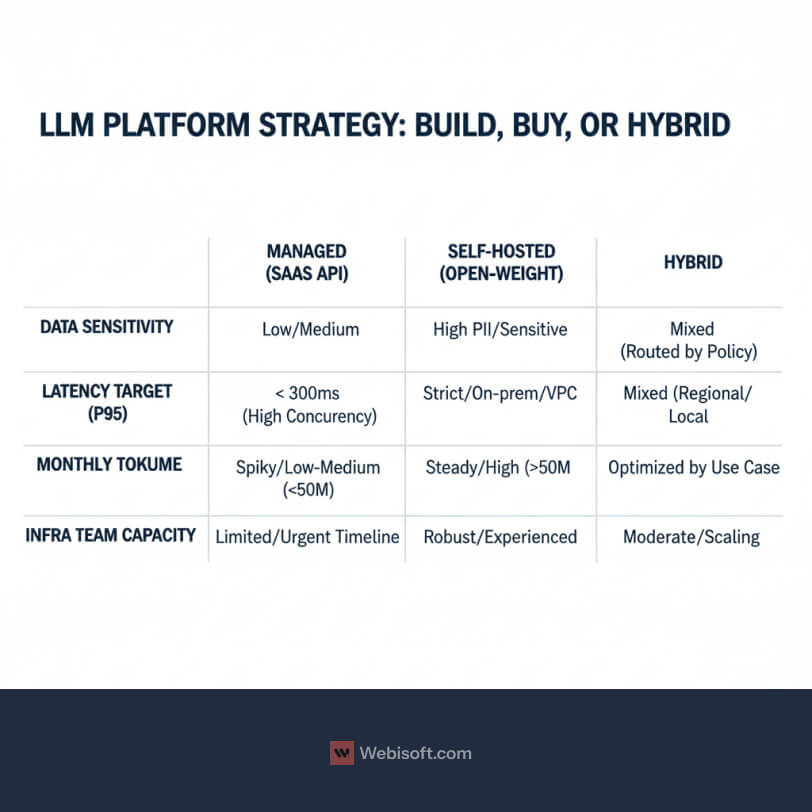
You are choosing a platform strategy, not just a model. The right answer depends on data sensitivity, latency targets, expected volume, and your team’s ability to run infrastructure. Use thresholds, not vibes.
Decision thresholds to start with:
- High PII or strict residency, lean to self-hosted or hybrid.
- Sub-300 ms P95 latency at high concurrency, consider managed inference with regional endpoints and caching.
- Over 50 million tokens a month on a steady workload, run a cost model for self-hosted.
- Limited infra talent or urgent timeline, pick managed first and plan for a hybrid future.
Context: Industry data shows cloud deployment dominates for speed and managed security, while regulated sectors often choose hybrid or on-prem for strategic workloads. Source: Future Market Insights.
Managed SaaS API: speed and continuous updates
This is the fastest path from idea to pilot. You get managed security controls, frequent model upgrades, and regional endpoints. You also inherit the vendor’s posture on data handling, retention, and export guarantees, so contract terms matter.
Use this when time to value is critical, when workloads are spiky, or when your team is still building the retrieval and guardrail layers. Pair it with zero-retention settings, private networking, and strict access control. Add an evaluation harness now, because vendors will ship new versions and you want to catch regressions before users do.
Watch the bill. Long contexts and generous retries can turn a small pilot into a big invoice. Cache where possible, set max context limits, and track P95 latency with concurrency.
Self-hosted or open-weight: control and sovereignty
Run models in your VPC or on-prem when data cannot leave, or when you need predictable unit costs at scale. You gain control over retention, network boundaries, and performance tuning. You also take on ops work: autoscaling, GPU planning, health checks, upgrades, and incident response.
Do the math. If your workload is steady and large, self hosting can make sense. It also unlocks model customization and private adapters without sending sensitive data to a third party. Build clear interfaces so your retrieval layer, safety filters, and evals keep working as you swap models.
Be honest about total cost. You will pay in GPUs, engineering time, and change management. The benefit is sovereignty and consistent performance.
Hybrid: best of both for regulated and mixed workloads
Most enterprises land here. Keep strategic or sensitive tasks in your environment, and route general tasks to managed APIs. Use a shared retrieval layer, a common guardrail service, and a control plane that selects models by policy.
Hybrid reduces vendor lock-in and lets you optimize cost per use case. It also requires clear routing rules and strong observability, because failures will cross boundaries. Treat the model as a replaceable part. Keep contracts tight on export, retention, and support SLAs, and keep your evals independent.
This pattern matches what we see in regulated sectors and global teams with regional data residency. It is a practical way to ship now and still meet compliance later.
Use Case Trends and Model Choice: General vs Domain Specific
Start with the job, not the logo. The right model depends on task shape, risk, and the type of knowledge your app needs at inference time.
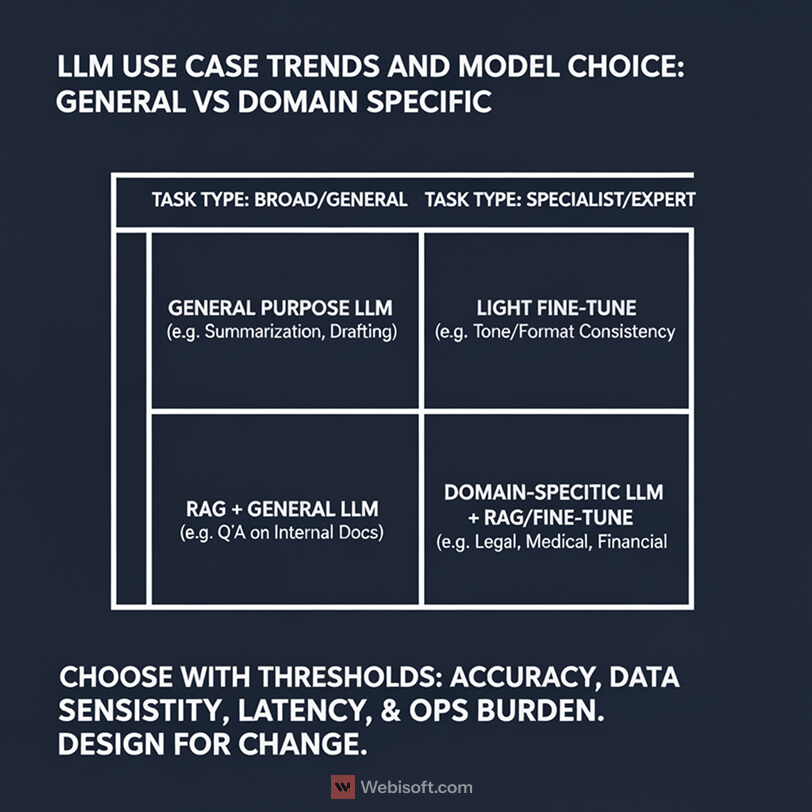
General purpose LLMs are still the default starting point. In 2024 they held 41.6 percent market share, which reflects how quickly teams can pilot broad tasks like summarization, drafting, and classification. You get strong language ability, frequent upgrades, and good tooling around safety and observability.
Domain specific LLMs are the fastest growing segment. Regulated and expert tasks need tighter control, higher relevancy, and less guesswork. Health, finance, and legal teams push here because the model must understand domain terms, follow strict style rules, and respect compliance constraints. With a narrower scope, these models can be smaller and faster. They also align better with policy and audit trails.
Use a simple selection rubric.
If your task relies on up to date company data, choose RAG with a strong retrieval layer. This handles policy documents, product catalogs, runbooks, and customer records. It also keeps sensitive facts out of the model weights. Tune prompts, embeddings, and rankers before reaching for heavy training.
If your task demands consistent tone, format, or specialist reasoning that goes beyond what retrieval can supply, consider light fine tuning on a base or domain model. Keep datasets clean and balanced. Write acceptance tests that check style, content rules, and edge cases. Pair a small fine tune with RAG when you need both structure and freshness.
Add thresholds so the decision is repeatable.
Pick general purpose when you need fast coverage across many tasks, early signals, and low ops burden. Move to domain specific when accuracy requirements are strict, when your ontology is stable, or when you need predictable latency at scale. If your compliance team blocks data transfer, prefer models that can run in your VPC and use retrieval over training.
Design for change. Keep retrieval, guardrails, and evaluation harnesses model agnostic. When a new domain adapter or a better base model shows up, you should be able to swap it in without breaking interfaces or dashboards.
Security, Privacy, and Compliance by Region
Most enterprise programs stall not because the model is weak, but because the data rules are vague. Recent survey work puts a number on it: 44 percent of enterprise users cite security and privacy as ongoing barriers, and the pattern is strongest in regulated industries. That is why so many teams choose hybrid or on-prem for strategic workloads.
Start with a clear picture of what the system can touch. Define which stores the retrieval layer can reach, which fields are masked, which prompts and responses get logged, and how long those logs are kept. If you use a managed vendor, pin zero-retention settings in the contract and document how they are enforced. Inside your own perimeter, keep encryption at rest and in transit, restrict cross-region traffic, and rotate keys on a schedule you can prove.
Regulation is easier to handle when you design for the strictest case. In the EU, lead with data minimization, purpose limitation, and regional hosting. California adds CCPA rights, so make subject access and deletion requests routine, not heroic. If you operate across multiple regions, default to the strict policy and record any local exceptions with their legal basis.
Identity belongs in the center of the diagram. Route every call through a control plane that applies role-based access and stamps an audit record you can search. Tag logs by data class and risk level. When someone reports a prompt injection, you should be able to find it, replay it, and show how the guardrail responded.
Incidents are decided long before the alert fires. Write signatures for jailbreaks and data exfiltration, set alert paths for on-call, and define rollback criteria that pin a model or configuration until review. For high-risk outputs, add a light human check and track false positives so you do not choke the system.
Compliance is not a sticker you apply at launch. Book quarterly reviews with security, legal, and data governance, and refresh your DPIA or equivalent whenever you change providers, move regions, or add new sources. The goal is a system that stands up to audits without slowing teams down.
Security, privacy, and compliance controls by region. Design to the strictest policy first, then document exceptions.
| Control | EU (GDPR) | California (CCPA/CPRA) | Multi-region/Global Notes |
|---|---|---|---|
| Data residency and hosting | Prefer EU region. Document processors and locations. | Prefer US region. Document processors and locations. | Keep a map of data flows. Block cross-region by default. |
| Data minimization and purpose | Collect only what is needed. State lawful basis and purpose. | Limit collection. State business purpose. Honor opt-out. | Keep a data inventory with owners and fields. |
| Zero retention for vendor calls | Require zero retention in contract and settings. Audit with canary prompts. | Same requirement. Add logging window if needed with strict limits. | Record control IDs and screenshots of settings. |
| Encryption | AES-256 at rest. TLS 1.2+ in transit. | Same controls. | Enforce HSTS and perfect forward secrecy. Rotate keys on schedule. |
| Identity and RBAC | Role based access. Least privilege. SSO required. | Same controls. | Route all calls through a control plane. No direct model calls. |
| Audit logging | Log prompts, responses, tool calls, user ID, risk tag, time. | Same controls. | Make logs searchable and immutable with retention policy. |
| Subject rights | Support access, correction, deletion, portability within SLA. | Support access, deletion, opt-out, limit use. | Build one workflow that meets the strictest rule. |
| DPIA or PIA | Required for high-risk processing. Review on major changes. | Perform risk assessment for sensitive data. | Re-run when providers change or new sources are added. |
| Vendor DPA and sub-processors | Sign DPA. Publish sub-processor list. 30-day notice on changes. | Sign addendum aligned to CPRA. Publish sub-processors. | Keep vendor artifacts in a central register. |
| Training use of data | Prohibit training on your data in contract. Verify in settings. | Same requirement. | Add contract breach remedy and audit rights. |
| Portability and export | Contractual right to export vectors, prompts, logs, eval sets. | Same requirement. | Test export and restore once per quarter. |
| Retention policy | Define log and cache windows. Justify by purpose. | Define windows. Honor deletion requests. | Pin retention in IaC. Track exceptions. |
| Incident response | 24–72 hour notice. Include scope, data classes, fix plan. | Same timelines unless contract says faster. | Run drills. Keep rollback rules and version pins. |
| Prompt and output scanning | Scan for PII, secrets, policy terms. Block or route on risk. | Same controls. | Maintain allow and deny lists for tools and data. |
| Retrieval permissions | Enforce document and row level ACLs before scoring. | Same controls. | Never pass unauthorized text to the model. |
| Freshness and accuracy | Index deltas quickly. Stamp last updated on answers. | Same controls. | Track retrieval hit rate and truncation. |
| Access reviews | Quarterly access review with sign-off. | Same controls. | Automate revocation for inactive accounts. |
| Key management | Customer managed keys preferred. Rotate and log access. | Same controls. | Separate duties. Monitor unusual usage. |
Observability and Guardrails: What Safe in Production Means
Production work needs light, not luck. If you cannot see quality, latency, and failure modes in near real time, you will argue about feelings instead of facts.
Vendors are moving in the right direction. Many managed LLM providers now include monitoring dashboards and formal SLO language in contracts, which helps procurement and operations speak the same language. Treat those dashboards as a starting point, then add your own views for the metrics that matter to your business.
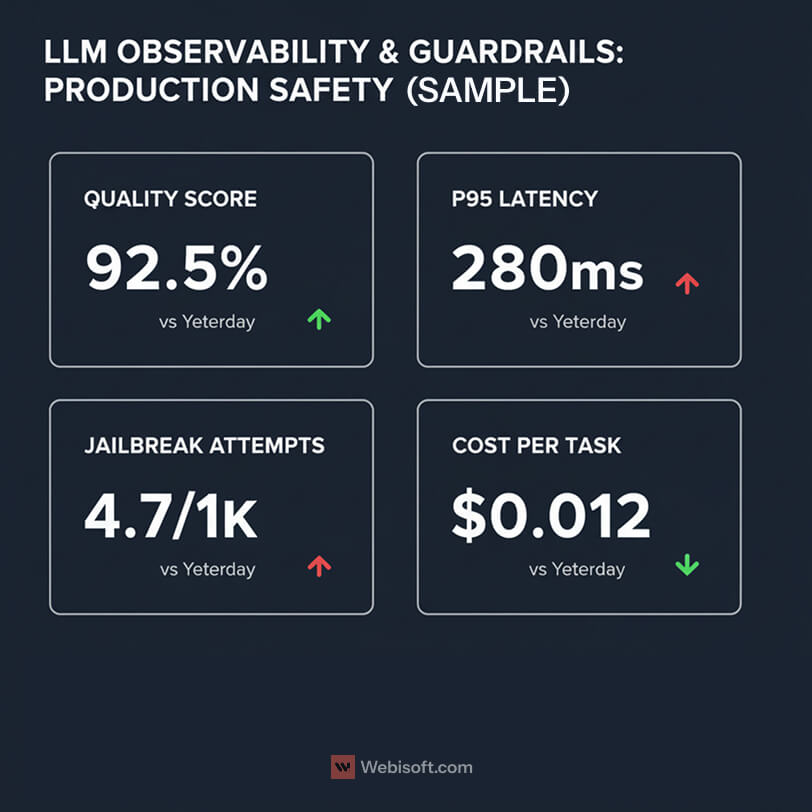
Track a small set of signals that predict user trust. Quality scores from evaluation sets. P95 and P99 latency at realistic concurrency. Cost per resolved task. Refusal and escalation rates. Jailbreak attempts per thousand requests. Retrieval hit rate and context truncation rate. If these move in the right direction, the rest usually follows.
Use evaluation data as a gate, not a report. Keep a versioned suite of tasks that match your production use cases. Add canary prompts that try prompt injection, secret fishing, and jailbreaks. Run the suite before releases, and run a lightweight sample hourly in production to catch drift early.
Guardrails are a layer, not a single filter. Validate inputs, scan outputs for PII and policy violations, and enforce allow and deny lists for tools and data scopes. Log the decision path. If a request crosses a risk boundary, route it to a safer model, remove risky tools, or require human approval. You can be strict without being slow if you keep the rules simple and visible.
Some actions deserve a person in the loop. Contract generation, customer refunds above a threshold, and regulatory communications should have a quick review step. Make it easy to capture that feedback and feed it back into prompts, retrieval, or a small fine tune.
Incidents are where programs earn their keep. Define thresholds that trigger automatic rollback or configuration pinning. Keep release toggles simple. After an incident, promote the failing case into your test suite so it never surprises you twice. Tie these behaviors to the SLOs you negotiate, so support and credits are clear.
Pick four charts for your team’s home screen: quality score, P95 latency, jailbreak hits, and cost per task. Wire alerts, name an owner, and budget time to keep these views healthy. That is how an enterprise LLM stays boring in the best way.
Cost Modeling and Capacity Planning, A Practical Approach
Costs look unpredictable until you break them into a few levers. Tokens, latency targets, concurrency, and cache behavior explain most of the bill. The rest is noise you can tame with simple rules.
Start with a quick model you can share in planning docs:
Unit cost per task ≈ [(tokens_in + tokens_out) × (1 − cache_hit_rate)] × price_per_token + guardrail_overhead + retrieval_cost.
Treat retries as a multiplier on tokens. Add a small fixed overhead for safety filters and logging. If you self host, substitute price_per_token with your run cost per token or per second.
Now scale it up. Estimate monthly active tasks, then apply your P95 latency target and expected concurrency. Concurrency is where teams under plan. A comfortable P50 does not mean your system can handle a product launch. Keep a headroom buffer and load test with realistic context sizes.
Context windows deserve special attention. Long prompts and oversized retrieved chunks multiply cost and slow responses. Set maximum context policies. Trim documents before indexing. Use smarter chunking and ranking so you include less text and still answer well.
Caching pays for itself. Cache deterministic prompts, system prompts, and stable RAG answers that do not change minute to minute. Track cache hit rate as a first class metric. Even a modest hit rate can cut unit costs and help you meet latency targets during spikes.
Batch when it will not hurt user experience. Classification and offline enrichment can run in batches with higher throughput. For interactive flows, prefer streaming to keep perceived latency low while the model finishes the tail of generation.
If you are considering self hosting, run the same math with GPU costs and utilization. Include idle time, autoscaling granularity, and the cost of keeping a warm pool. The benefit is predictable unit cost for steady workloads and more control over latency.
My rule of thumb in reviews is simple. Protect P95 latency and cache aggressively. Keep context lean. Measure unit cost per resolved task every week. When those three numbers look good, the rest of the system usually behaves.
Read More: Blockchain Consultant vs Developer: What’s the Difference?
Benchmarking That Predicts Production Performance
Benchmarks should answer one question: will this system behave the way we expect once real users arrive. That means tests that reflect your data, your tasks, and your risk tolerances, not generic leaderboards.
Task-specific evaluations that match the job
Start with the outcomes you need. If support agents rely on grounded answers, measure factual accuracy against your own knowledge base and record citation quality. If finance teams need structured outputs, check schema adherence and the share of responses that pass validation without manual edits.
Build a small but trusted “gold” set from production-like data. Include easy, normal, and ugly cases. Keep prompts and acceptance rules versioned in Git so you can reproduce results after a model or retrieval change. Run the suite for pre-release checks and a lightweight sample on a timer in production to catch drift.
Make retrieval part of the test. Track retrieval hit rate, context truncation, and the impact of reranking. For generation, log pass rates by task type and by risk class so you can focus improvements where the business actually feels them.
Human-in-the-loop ratings and agreement
Numbers alone are not enough. Add a human review layer with simple, repeatable rubrics. Five-point scales for correctness, usefulness, and tone work well, paired with a short free-text note when a score is low. Sample from real traffic, blind the model identity, and mix in seeded tests so reviewers do not only see happy-path cases.
Check inter-rater agreement at least monthly. When reviewers disagree often, refine the rubric or split the task into clearer subtypes. Many enterprise teams now treat human-in-the-loop monitoring as part of the production evaluation protocol, and they connect those results to service objectives.
Close the loop. Feed recurring failure patterns back into prompts, retrieval, or a light fine tune, and retire tests once the issue is solved.
Latency and throughput SLOs
Quality without speed still fails in production. Define P95 and P99 latency targets with the context sizes you actually use. Test at expected concurrency plus headroom, and include cold starts, cache misses, and long-context cases in the mix. Measure token throughput, streaming start time, and end-to-end time from user click to first useful token.
Publish acceptance gates: release only if the eval pass rate stays above threshold, P95 is inside target, and error or refusal rates remain steady. When a change fails, pin versions, roll back, or route to a safer policy. Promote failing cases into your gold set so the same problem cannot surprise you twice.
Vendor and Contract Checklist, What to Ask Before You Sign
Procurement is where good intentions become guardrails. Bring a clear list, then hold the line.
Data usage and retention
- Put training use in writing. Either “never train on our data” or the exact scopes that are allowed.
- Require zero retention mode for prompts, responses, and embeddings, or a strict log retention window with encryption at rest and in transit.
- Ask for data residency options and a current sub-processor list with notice periods for changes.
Privacy and compliance
- Attach a DPA that matches your jurisdictions. If you are in healthcare, include a BAA.
- Ask for recent SOC 2 Type II or ISO 27001 evidence, plus pen-test summaries you can review under NDA.
Portability and exit
- Demand export guarantees for all artifacts: prompts, eval sets, vectors, chat transcripts, and fine-tune weights where applicable.
- Confirm that API contracts are stable and versioned, and that you can pin versions during change windows.
SLOs and reliability
- Uptime target, error budgets, and latency SLOs at realistic concurrency.
- Credit schedule for misses, plus a clear definition of force majeure.
- Disaster recovery and regional failover plan you can test.
Security controls
- Private networking options, customer-managed keys if available, and role-based access.
- Audit logs you can search by user, app, and data class, with log retention you control.
Safety and evaluation
- Built-in safety filters, jailbreak protections, and prompt-injection detections.
- A change-notice SLA for model updates, plus time to re-run your evaluation suite before a forced cutover.
Support and pricing
- Named support tiers with response times for P0 to P3.
- Pricing that states token rounding rules, context window pricing, and treatment of retries.
- A fair cap on overage charges during incidents caused by the provider.
Two final asks that save teams later. Get a sample redacted contract with tracked changes before legal starts. Run a 30-day paid pilot under near-final terms so your acceptance tests and the vendor’s SLOs meet in the middle.
Enterprise Search and Knowledge, Beyond a Chat Interface
If your “LLM strategy” is a chatbot on top of a messy knowledge base, users will find the seams in a week. Enterprise search needs structure, permissions, and freshness, then generation on top of that foundation.
Start with what you index and how you chunk it. Contracts, tickets, specs, runbooks, Slack exports, and wikis all look different at retrieval time. Split by semantic boundaries, not page length. Normalize titles, owners, dates, and confidentiality tags as first-class fields. Keep linkbacks so answers point to the source of truth.
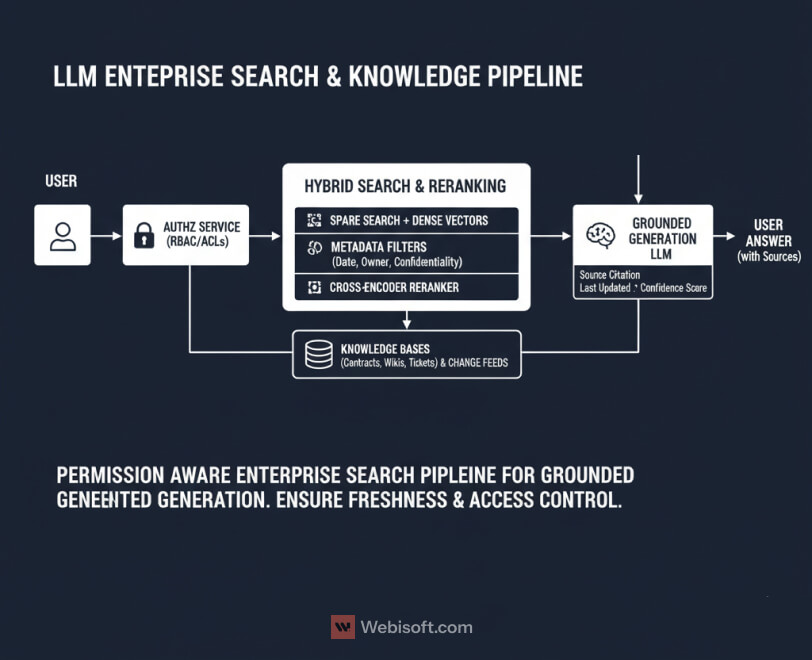
Permissions must match the real world. Enforce row level and document level ACLs in the retrieval layer, not in the UI. I route every query through an identity aware service that filters results before scoring, so the model never sees what the user should not. It keeps legal calm and makes audit trails clean.
Freshness is a feature, not an afterthought. Use change feeds or webhooks to reindex deltas quickly. Add time decay to ranking when recency matters, and store the last indexed hash so you skip work on unchanged files. If your content team publishes release notes at 5 pm, your answers should reflect that by 5:05.
Blend retrieval signals. Sparse search still wins on exact IDs and rare terms. Dense vectors shine on fuzzy phrasing. I use hybrid search, then rerank the top candidates with a small cross encoder before handing them to generation. When recall drops, fall back to UI affordances like filters or a “search within source” link.
Measure retrieval like you measure models. Track recall at K, MRR, context truncation, and source click through. If users never click sources, your grounding is weak. If truncation is high, your chunks are noisy or too big.
Finally, design answers to teach users. Cite sources inline, label “last updated,” and show the path the system took. Confidence grows when the system shows its work.
Change Management and Risk Controls for Rollout
Technology is rarely the blocker. Habits are. If you want the program to stick, write the rules and teach them the same week you ship your first pilot.
Start with a simple, readable AI usage policy. Spell out which data is allowed, which is off limits, and what “good” looks like for prompts and outputs. Keep the examples specific to your tools, not generic. Add a short section on how to report a bad answer or a suspected leak. Make that path easy.
Training should feel like onboarding to a product, not a lecture. Teach prompt hygiene, citation habits, and how to use retrieval filters. Run short exercises with real documents. Give people a checklist they can keep at their desk, and a way to ask for help that gets a human reply the same day.
Red-team drills are worth the hour they take. Seed a few prompt injections and secret exfiltration attempts, then let volunteers try to break the system. Log everything. The point is not to shame users. It is to harden guardrails and raise awareness before a real incident shows up.
Roll out in waves. Pick one team, ship one or two workflows, and hold weekly office hours. When the metrics look healthy, expand to the next group. Keep a running change log so everyone can see what moved, why it moved, and who owns the follow-up.
Give the program clear owners. A lightweight RACI works: product owns scope and success metrics, engineering owns the platform, data owns retrieval quality, security owns controls and audits, and legal signs off on policy and contracts. When a decision crosses teams, write it down and time box it.
You will make changes. That is normal. The program succeeds when those changes are safe, fast, and documented.
The 90-Day Rollout Plan (How To)
A good plan keeps people focused and keeps risk contained. Use this 3 phase path and treat each phase as a release with clear gates.
Days 1 to 30: Foundations
Pick one valuable use case with clear acceptance tests. Inventory data sources, label sensitivity, and decide what retrieval can touch. Stand up the control plane for identity, network boundaries, logging, and secrets. Choose your deployment pattern and set zero retention with any managed vendor.
Build a small evaluation suite from production like examples. Create a minimal retrieval pipeline with clean chunking and metadata. Wire basic observability for quality, latency, and cost per task. Draft your AI usage policy and schedule a short training. Write rollback criteria now, not after the first incident.
Gate to next phase only if eval pass rate, P95 latency, and security checks meet target.
Days 31 to 60: Pilot
Ship a thin slice to real users and keep scope narrow. Add guardrails for input validation, output scanning, and tool permissions. Tune prompts, reranking, and chunk sizes with weekly experiments. Turn on caching and set sane max context policies.
Put a human in the loop for high risk actions. Monitor dashboards daily and run the eval suite before each change. Close your contracts with data usage terms, export guarantees, SLOs, and support tiers. Capture user feedback in one place so patterns are easy to spot.
Advance when pilot users complete tasks at or above target quality, and support load is stable.
Days 61 to 90: Scale
Expand to a second team or a second workflow. Add capacity planning, autoscaling rules, and a warm pool if traffic is bursty. Pin versions for busy periods, and rehearse rollbacks. Document the on-call path and test incident drills.
Harden retrieval with permission filtering and freshness triggers. Publish a change log and a simple success dashboard for stakeholders. Finish the long term training plan and name owners for policy, retrieval quality, guardrails, incidents, and evaluations.
Promote the rollout only when SLOs hold under expected concurrency and the unit cost per resolved task is inside budget.
Case Snapshots by Function, What Good Looks Like
Real programs win by solving specific jobs. Here are four anonymized snapshots you can adapt without changing your stack.
Customer support
Context: large knowledge base, repetitive policy questions, partial answers spread across tools.
Approach: RAG over tickets, runbooks, and policy docs with permission filtering. Add input validation, output scanning, and inline citations. Keep a quick human check for refunds or escalations.
KPI focus: first contact resolution, average handle time, grounded citation rate, and deflection rate from email to self-serve.
Sales enablement
Context: long RFPs, tribal knowledge in slides and Slack, inconsistent messaging.
Approach: identity aware retrieval across past proposals, product docs, and legal clauses. Provide answer stubs with source links and a style checker for tone and claims. Route contract language to a safer model and require reviewer sign off.
KPI focus: time to first draft, redline iterations, proposal win influence, and percent of answers with verifiable sources.
Operations
Context: noisy alerts, changing runbooks, slow triage on handoffs.
Approach: event summarization with grounded links to current procedures. Add tool permissions that only expose read actions by default. Let authorized users promote a suggestion into a ticket or change request with one click.
KPI focus: mean time to acknowledge, mean time to resolve, correct playbook selection rate, and rollback occurrences.
Engineering productivity
Context: new hires struggle to find the “why” behind decisions, specs are scattered.
Approach: code and design retrieval with commit messages, ADRs, and incident notes indexed as first-class fields. Generate draft RFC sections with citations and a checklist that enforces your template. Keep generation offline for nontrivial code and run diffs through CI checks.
KPI focus: time to first merged PR for new engineers, RFC cycle time, and documentation coverage.
A quick personal note: the biggest lift usually comes from clean metadata. When titles, owners, and dates are reliable, retrieval quality jumps without changing the model.
FAQ, Decision-Level Answers
Is a private LLM always safer than a managed API?
Not by default. Safety comes from controls you enforce. With a managed API, you can still require zero retention, private networking, and strict RBAC. With self-hosted, you gain sovereignty but you also own patching, keys, and incident response. Choose the model plus the controls.
RAG or fine tuning, which cuts hallucinations more?
RAG usually wins for factual work that depends on current internal sources. Fine tuning helps with format, tone, and domain reasoning. For many teams, a small fine tune on top of solid retrieval gives the best mix of fidelity and consistency.
What is a sensible P95 latency target for enterprise apps?
Under one second feels responsive for most text tasks. If your workflow is interactive chat, streaming the first token within 200–300 ms keeps users engaged even when the full response takes longer. Always test at expected concurrency.
How do we prevent our IP from training vendor models?
Put it in the contract and in the settings. Require written “no training on our data,” turn on zero retention, and audit with test prompts that include canary tokens. Ask for a sub-processor list and change-notice windows.
How do we evaluate quality without building a research team?
Create a small gold set from real tasks, write crisp acceptance checks, and run it before releases. Add a lightweight human rating pass each week. Promote failing cases into the set so problems do not repeat.
When should we standardize on one model family?
Standardize the platform first. Use a control plane, retrieval, guardrails, and evals that tolerate multiple models. Locking the platform makes swapping models boring, which is exactly what you want.
Next Steps
Pick one high value use case and turn this guide into a plan. Write three numbers on the whiteboard: monthly active tasks, target P95 latency at expected concurrency, and unit cost per resolved task. Those three will steer architecture, guardrails, and budget.
Stand up the foundations first. A control plane for identity and policy. A retrieval layer that respects permissions. A small evaluation suite that mirrors real work. When these feel predictable, move into a short pilot with weekly checkpoints and clear rollbacks.
If you want a partner that has shipped this before, bring in Webisoft. We work as enterprise LLM consultants and developers, from discovery and cost modeling to RAG design, guardrails, evaluation rubrics, and procurement support. We can co own the platform, coach your team, or deliver a turnkey workflow with dashboards and acceptance tests.
Expand in waves once the pilot meets its gates. Add one more workflow or one more team, not five. Keep a visible change log and name owners for policy, retrieval quality, guardrails, incidents, and evaluations.